
Why Is My Webhook Not Receiving Events?
A debugging checklist: status, filters, endpoint response, blocked URLs, quota — in the order that finds the culprit fastest

Written by Erick Horn
July 6, 2026
Updated July 21, 2026
Why is my webhook not receiving events?
A webhook that receives nothing almost always has one of five causes, and they are quick to tell apart: the webhook’s status is not active (paused, or auto-disabled after failures), its saved-search filters match no new articles, your endpoint does not answer 2xx within 30 seconds, the endpoint URL is blocked by APITube’s safety checks, or the account has no webhook quota left. Walk the checklist below in order — each step takes a minute and rules out one cause.
Is the webhook status still “active”?
Only an active webhook receives deliveries. Check the status on the webhook’s detail page in the dashboard or over the API:
curl "https://api.apitube.io/v1/webhooks" -H "X-API-Key: YOUR_API_KEY"Two non-active states look similar but mean different things. paused means someone paused it deliberately. disabled means APITube switched it off automatically after 3 consecutive failed deliveries — the most common reason a webhook “suddenly” goes quiet after a deploy that briefly broke your endpoint. Either way, the fix is the same: set the status back to active in the dashboard or with PATCH /v1/webhooks/:id and body {"status":"active"}. The auto-disable rule itself is explained in webhook retries and delivery history.
Do your filters actually match any new articles?
A webhook only fires for articles that match its saved search, and a saved search that is too narrow fires never. Test the exact same filters against the search endpoint — a webhook’s filters are the same dot-notation parameters /v1/news/everything accepts:
curl "https://api.apitube.io/v1/news/everything?title=acme&language.code=en&source.domain=reuters.com&api_key=YOUR_API_KEY"If this search returns an empty results array, the webhook is working correctly — there is simply nothing to deliver. Loosen one filter at a time (drop source.domain first, it is usually the tightest) until articles appear, then update the webhook’s filters to the widest version that still matches what you want. The technique is the same as debugging a search that returns no results, and every accepted filter is listed in the official News API parameters reference.
Does your endpoint answer 2xx within 30 seconds?
APITube counts a delivery as successful only when your endpoint replies with an HTTP 2xx status within 30 seconds. Everything else is a failure: a 4xx or 5xx, a 3xx redirect (redirects are not followed), a connection error, or a handler that takes longer than 30 seconds. Three failures in a row and the webhook is disabled.
The robust pattern is acknowledge-then-process: store the payload, return 200 immediately, and do slow work (parsing, enrichment, database writes) asynchronously. Retries resend the same batch with the same X-Webhook-Delivery-Id header, so an endpoint that already processed a delivery ID should ignore the repeat and still answer 2xx.
Is the endpoint URL reachable from the public internet?
Before every send, APITube resolves your URL’s DNS and refuses to deliver to addresses that could be used to probe internal infrastructure. Blocked destinations include localhost and *.localhost, loopback (127.0.0.0/8), private ranges (10.0.0.0/8, 172.16.0.0/12, 192.168.0.0/16), link-local (169.254.0.0/16), carrier-grade NAT (100.64.0.0/10), and their IPv6 equivalents. A hostname whose DNS fails to resolve is also treated as blocked.
This is why a webhook pointed at a development machine, an internal hostname, or a VPN-only address never receives anything: the delivery is rejected before it is sent, and the delivery history shows a failure with no HTTP status code. Use a public HTTPS endpoint, or a tunnel (ngrok and similar) while developing.
Do you still have webhook quota?
Webhook deliveries bill per delivered article from your webhook credits, falling back to a positive pay-as-you-go balance on paid plans. When both are at zero, deliveries stop until credits renew or you top up. Check the balances on the dashboard’s usage page, and see what counts as a request for how each pool is spent. Failed deliveries are never charged.
Still stuck? Send a test event
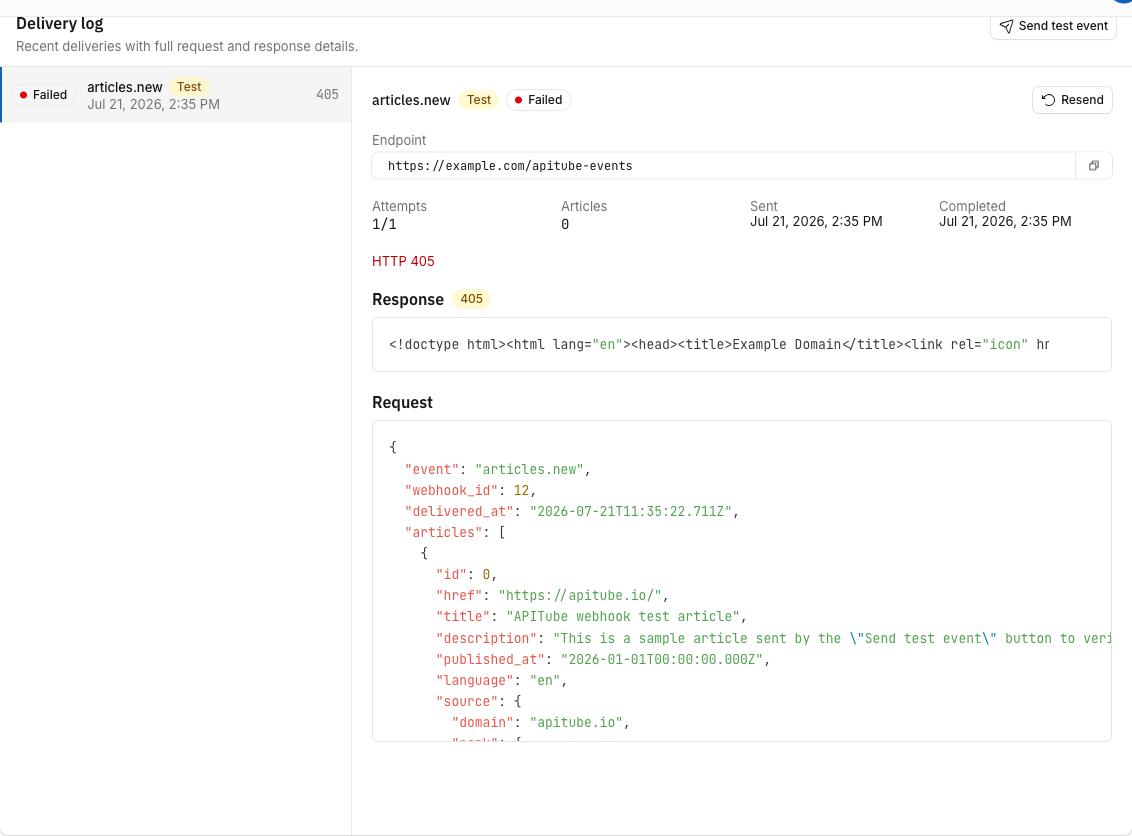
The Send test event button on the webhook’s detail page delivers a signed sample payload to your endpoint immediately, bypassing the delivery worker and your billing. It works even while the webhook is paused or disabled, and the result — HTTP status, request and response bodies — lands in the delivery history. If the test event arrives but real deliveries do not, the problem is filters or quota; if the test event fails too, the problem is your endpoint or the URL. Verifying the signature on that test payload is covered in how to verify webhook signatures.
Common Questions
- How quickly should a new article arrive?
- Are failed deliveries retried?
- Am I charged while the webhook delivers nothing?
- Why did my webhook go quiet right after a deploy?
How quickly should a new article arrive?
The delivery worker scans for new matching articles roughly every 10 seconds and sends up to 100 articles per delivery. If a matching article was indexed and your webhook is active, expect the POST within seconds — a delay of minutes points at retries in progress or at your endpoint responding slowly.
Are failed deliveries retried?
Yes — each delivery is attempted up to 5 times in total, with gaps of about 1 minute, 5 minutes, 30 minutes and 2 hours between attempts. Every attempt appears in the delivery history with the returned status code. The full schedule and the auto-disable rule are in webhook retries and delivery history.
Am I charged while the webhook delivers nothing?
No. Billing happens per successfully delivered article — a webhook that matches nothing, is paused, or fails to deliver costs zero. You only spend quota when your endpoint actually returns 2xx for a batch of articles.
Why did my webhook go quiet right after a deploy?
If the deploy made your endpoint return errors for a few deliveries in a row, APITube disabled the webhook after 3 consecutive failures. Fix the endpoint, then set the webhook’s status back to active — deliveries resume from there. To avoid a repeat, keep the acknowledge-then-process pattern from above: a fast 2xx survives slow downstream code, and the delivery history shows you the first failure the moment it happens.