
How to Set Up a Webhook for a Saved Search
Create a webhook in the APITube dashboard so new matching articles are pushed to your endpoint

Written by Erick Horn
June 27, 2026
Updated July 21, 2026
How to set up a webhook for a saved search
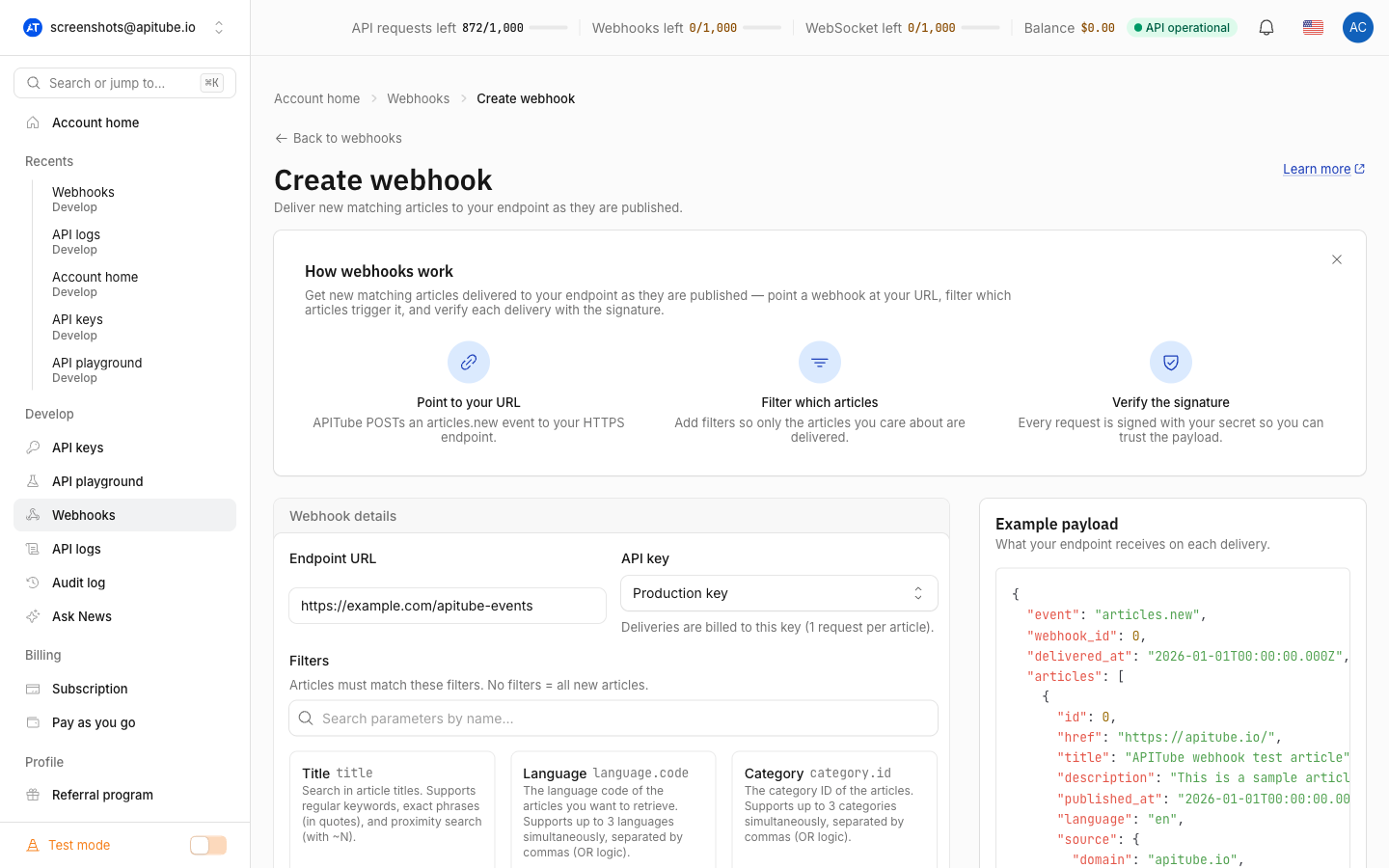
You set up an APITube webhook in the dashboard, not over the API. Open the dashboard, go to Webhooks → Create webhook, enter the endpoint URL that should receive deliveries, choose the API key the webhook bills against, build the saved-search filters that decide which articles qualify, and create it. APITube then watches for new matching articles and POSTs them to your URL. There is no POST /v1/webhooks endpoint — creation lives in the dashboard on purpose, because that is where the per-plan webhook limit is enforced.
Where do you create a webhook?
Webhooks are created on the Create webhook page in the dashboard (/webhooks/new), reachable from the Webhooks list. The API itself only exposes endpoints for webhooks that already exist — listing, reading, updating and deleting — so there is no way to create one with a curl call. If you are looking for the concept first, read what webhooks are and how they work; this article is the step-by-step setup.
To create a webhook you need a role that can manage them: an owner, admin or member can create webhooks, but a viewer cannot. You also need at least one active API key in the current workspace, since every webhook is tied to a key.
What do you enter when creating a webhook?
The Create webhook form has three inputs:
- Endpoint URL — the address APITube delivers to. It must be a valid
http://orhttps://URL. Plainhttp://is accepted but the form warns against it, because the request body carries article data and a signature header; use HTTPS in production. URLs that resolve to loopback or private network addresses are rejected. - API key — the key the webhook delivers under. Pick a live key for real content or a test key to try the flow first. The key must belong to the current workspace and must not be revoked.
- Filters — the saved search. The builder offers the same dot-notation filters as the
/v1/news/everythingsearch, so a webhook delivers exactly the articles that search would return.
How do you choose the filters for a saved search?
A webhook’s filters are a subset of the regular News API search filters — the same parameters you would use on /v1/news/everything, minus the request-time options that make no sense for a push subscription (sorting, pagination, field selection, facets, highlighting). So you can scope a webhook by title keywords, language, country, source domain, category, entities, sentiment and the other search filters.
For example, a saved search for English-language coverage of a company from a specific source is expressed with the same parameter names you already know:
title=acme
language.code=en
source.domain=reuters.com
Build the filters narrowly. The webhook only fires for articles that match, so a tight saved search means fewer, more relevant deliveries. The full list of filter parameters lives in the official News API parameters reference, and you can read how individual filters behave in articles like how to filter news by category.
Where is the signing secret?
When the webhook is created, the dashboard shows a signing secret that starts with whsec_. Use it to verify that incoming deliveries really came from APITube by checking the X-Webhook-Signature header.
The signing secret is shown once, right after you create the webhook. Copy it immediately and store it somewhere safe — the dashboard never displays it again, and there is no endpoint that returns it. If you lose it, you will need to recreate the webhook.
The signature is an HMAC-SHA256 over the timestamp and the request body, keyed with this secret. The full verification recipe — header format, what to hash, and how to compare safely — is in how to verify webhook signatures.
How to test the webhook before going live
After creating a webhook you can send a test event from its detail page. This delivers a signed sample payload to your endpoint immediately, bypassing the normal delivery worker. The test works regardless of the webhook’s status (active, paused or disabled), does not touch your billing, and records the result in the delivery history so you can inspect the response status and body. Use it to confirm your endpoint receives the request, validates the signature and replies with an HTTP 2xx before you rely on real deliveries.
How to manage a webhook after creating it
Once a webhook exists, you can manage it over the API as well as in the dashboard. The API exposes read and management endpoints — but never creation:
# List your webhooks
curl "https://api.apitube.io/v1/webhooks" -H "X-API-Key: YOUR_API_KEY"

# Pause one (status accepts active or paused)
curl -X PATCH "https://api.apitube.io/v1/webhooks/7" \
  -H "X-API-Key: YOUR_API_KEY" -H "Content-Type: application/json" \
  -d '{"status":"paused"}'

# Delete one
curl -X DELETE "https://api.apitube.io/v1/webhooks/7" -H "X-API-Key: YOUR_API_KEY"
PATCH /v1/webhooks/:id can change the URL, the filters or the status. A status of paused stops deliveries without deleting the webhook; switching it back to active resumes them — and also reactivates a webhook that APITube auto-disabled after repeated failures (covered in webhook retries and delivery history).
Common Questions
- How many webhooks can I create?
- Can I create a webhook through the API?
- Who on my team can create a webhook?
- Can I pause a webhook instead of deleting it?
How many webhooks can I create?
The number of webhooks is capped by your plan: Free 1, Starter 5, Basic 5, Professional 20, and Corporate 100. The limit is counted per account owner across all workspaces, and test-key and live-key webhooks are counted separately — so a Free account can have one live webhook and one test webhook. If you hit the cap, the dashboard prompts you to upgrade before you can add another.
Can I create a webhook through the API?
No. There is no POST /v1/webhooks endpoint — webhook creation is deliberately dashboard-only, so the per-plan limit is always enforced. Over the API you can only list (GET /v1/webhooks), read (GET /v1/webhooks/:id), update (PATCH /v1/webhooks/:id) and delete (DELETE /v1/webhooks/:id) webhooks that already exist.
Who on my team can create a webhook?
In a workspace, the owner, admins and members can create and manage webhooks. Viewers have read-only access and cannot create one. Each webhook is tied to an API key in the workspace, and deliveries bill against that key’s account.
Can I pause a webhook instead of deleting it?
Yes. Set the webhook’s status to paused — in the dashboard or with PATCH /v1/webhooks/:id — to stop deliveries while keeping the configuration and signing secret. Set it back to active to resume. Deleting a webhook is permanent and also removes its delivery history, so pause it if you only need a temporary stop.