
What Are Webhooks and How Do They Work?
How APITube pushes new articles matching your saved search to your endpoint by HTTP POST

Written by Erick Horn
June 27, 2026
Updated July 21, 2026
What are webhooks and how do they work?
A webhook is a saved search that pushes results to you: instead of repeatedly calling the News API to ask “anything new?”, you register a URL once, and APITube sends an HTTP POST to that URL whenever new articles match your filters. Each webhook stores a set of search filters, a destination URL and a signing secret; a background worker watches for new matching articles and delivers them to you in near real time.
This flips the usual model. Polling means you pull on a timer and mostly get empty responses; a webhook means APITube pushes only when there is something new, so your endpoint does less work and sees new coverage sooner.
How does APITube deliver a webhook?
Delivery runs in a separate worker from the API itself. About every 10 seconds it goes through your active webhooks and, for each one, looks for articles newer than the last one it sent — APITube keeps a high-water mark per webhook, so every article is delivered once and you never get repeats. It applies that webhook’s saved filters to the new articles, takes up to 100 articles per delivery, and POSTs them as JSON to your URL.
Your endpoint signals success by replying with an HTTP 2xx status. APITube does not follow redirects, blocks delivery to private or loopback addresses, and gives your endpoint 30 seconds to respond before treating the attempt as failed. A fast 2xx acknowledgement is all that is required — do slow processing afterwards.
What does a webhook request look like?
Every delivery is a POST with a JSON body and a set of X-Webhook-* headers:
POST https://your-app.example.com/webhook
Content-Type: application/json
X-Webhook-Signature: sha256=...
X-Webhook-Id: 7
X-Webhook-Delivery-Id: 42
X-Webhook-Timestamp: 1709000000
{
"event": "articles.new",
"webhook_id": 7,
"delivered_at": "2026-06-27T12:00:00.000Z",
"articles": [
{ "id": 123, "title": "...", "source": { "domain": "reuters.com" } }
]
}The articles array carries the same article objects you get from a news search. X-Webhook-Id identifies the webhook (it matches webhook_id in the body), and X-Webhook-Delivery-Id identifies the individual delivery and stays stable across retries, so you can deduplicate. The X-Webhook-Signature header lets you prove the request really came from APITube — see how to verify webhook signatures.
What happens when a delivery fails?
If your endpoint returns a non-2xx status, times out, or cannot be reached, the delivery is marked failed and queued for retry by a separate retry pass. After 3 consecutive failed deliveries, APITube automatically disables the webhook until you re-enable it — so a deploy that breaks your endpoint can knock the webhook offline. The full retry schedule and where to inspect every attempt are covered in understanding webhook retries and delivery history.
Billing is tied to success: you are charged per article that is actually delivered, and only when your endpoint returns 2xx. Failed attempts cost nothing; if a delivery fails and later succeeds on a retry, it is billed once, at success.
How do I create and manage a webhook?
Webhooks are created in the dashboard, where you set the URL and the saved-search filters and receive the signing secret (it starts with whsec_). There is no public POST /v1/webhooks endpoint — creation lives in the dashboard on purpose.
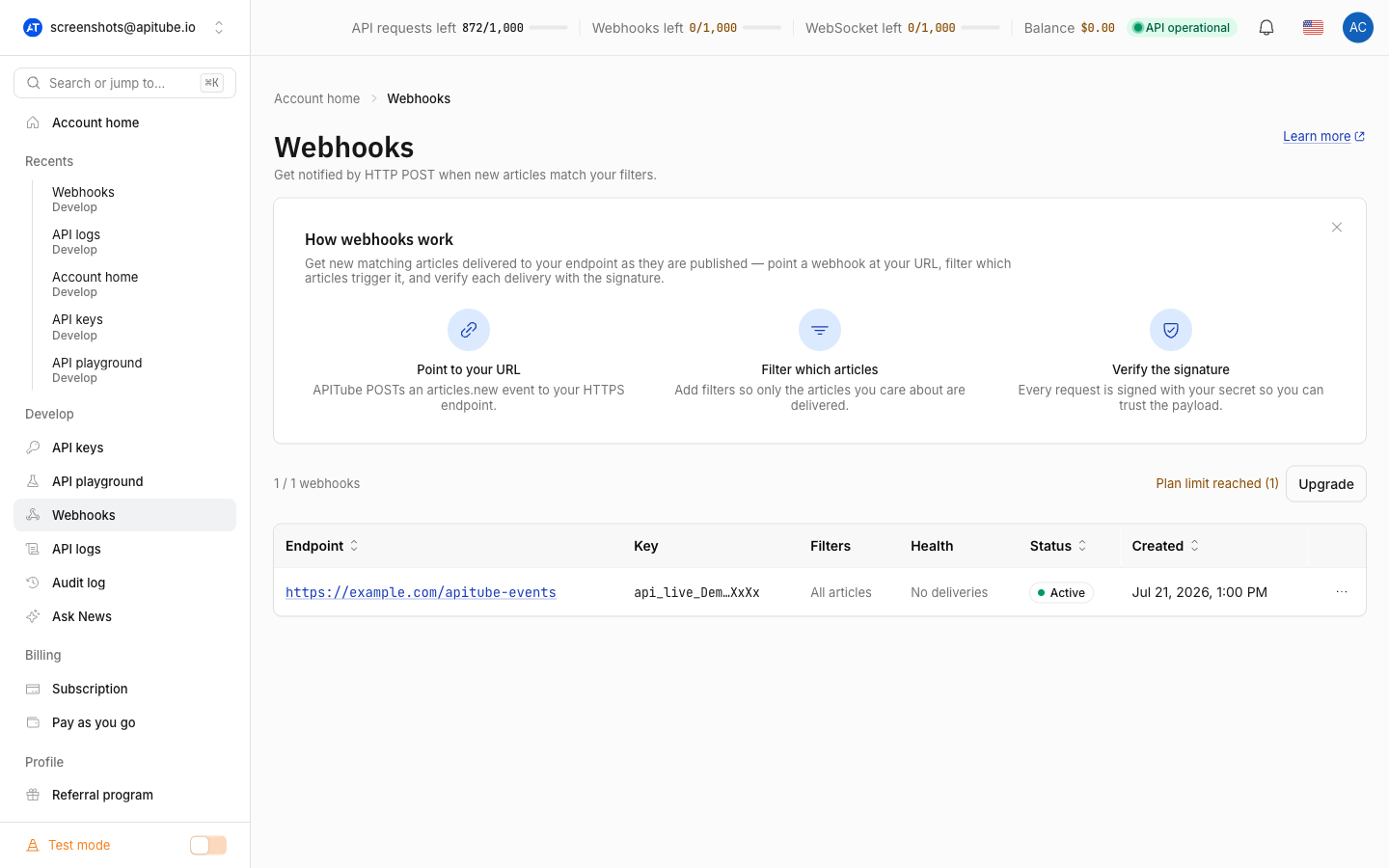
Over the API you can only list and manage webhooks that already exist:
# List your webhooks
curl "https://api.apitube.io/v1/webhooks" -H "X-API-Key: YOUR_API_KEY"

# Inspect one
curl "https://api.apitube.io/v1/webhooks/7" -H "X-API-Key: YOUR_API_KEY"

# Delete one
curl -X DELETE "https://api.apitube.io/v1/webhooks/7" -H "X-API-Key: YOUR_API_KEY"
GET /v1/webhooks and GET /v1/webhooks/:id read your webhooks, PATCH /v1/webhooks/:id updates an existing one (for example to change its URL or pause it), and DELETE /v1/webhooks/:id removes it.
Common Questions
- How is a webhook different from polling the API?
- Will I receive the same article twice?
- How many articles arrive in one delivery?
- Do test keys deliver webhooks?
How is a webhook different from polling the API?
Polling means your code calls a search endpoint on a schedule and filters out what it has already seen, spending requests even when nothing changed. A webhook inverts that: APITube tracks what is new for you and only contacts your endpoint when matching articles appear, usually within seconds. Webhooks suit “tell me when X happens” alerting; a direct search call still suits one-off lookups and backfilling history.
Will I receive the same article twice?
Not under normal operation. APITube records a high-water mark per webhook and only sends articles newer than the last delivered one, so each article goes out once. The exception is a retry of a failed delivery, which resends the same batch — use the X-Webhook-Delivery-Id header to recognise and ignore a repeat while still returning 2xx.
How many articles arrive in one delivery?
Up to 100 articles per delivery. If more than 100 new articles match between checks, they are split across consecutive deliveries, each carrying its own X-Webhook-Delivery-Id. Your endpoint should loop over the articles array rather than assuming a single item.
Do test keys deliver webhooks?
Yes, but with a preview. A webhook tied to a test key (one whose key starts with api_test_) still fires, but the article content is masked and the delivery does not consume your quota. Use a test key to confirm your endpoint receives, verifies and acknowledges deliveries before switching the webhook to a live key for real content.