
Understanding Webhook Retries and Delivery History
How APITube retries failed webhook deliveries, when a webhook is auto-disabled, and where to inspect every delivery

Written by Erick Horn
June 26, 2026
Updated July 21, 2026
Understanding webhook retries and delivery history
When a webhook delivery fails, APITube retries it automatically up to 5 times in total with growing gaps between attempts, and disables the webhook after 3 consecutive failed deliveries. Every attempt — successful or not — is recorded in the webhook’s delivery history in your dashboard, including the HTTP status code your endpoint returned and the exact request and response bodies.
A delivery counts as successful only when your endpoint replies with an HTTP 2xx status. Any other response — a 4xx, a 5xx, a 3xx redirect (APITube does not follow redirects), a connection error, or a timeout after 30 seconds — is treated as a failure and queued for retry.
How many times does APITube retry a failed delivery?
APITube attempts each delivery up to 5 times total: the initial send plus 4 retries. The gaps grow after each failure so a briefly-down endpoint gets time to recover without being hammered:
- 1st retry — about 1 minute after the first failure
- 2nd retry — about 5 minutes later
- 3rd retry — about 30 minutes later
- 4th retry — about 2 hours later
A background worker checks for due retries once a minute, so these times are “at least this long,” not exact-to-the-second. After the 5th failed attempt the delivery is marked failed permanently and is not retried again.
Each retry resends the same articles from the original batch (a delivery carries up to 100 articles). The X-Webhook-Delivery-Id header stays the same across every retry of one delivery, so your endpoint can deduplicate: if you already processed a delivery ID, ignore the repeat and still return 2xx.
When does APITube disable a webhook?
A webhook is automatically disabled after 3 consecutive failed deliveries. APITube looks at the most recent deliveries for that webhook; a run of failures with no success in between trips the limit and flips the webhook’s status to disabled. A disabled webhook stops receiving new deliveries until you re-enable it from the dashboard.
This is why a single bad deploy can knock a webhook offline: if your endpoint returns errors for a few deliveries in a row, the webhook is disabled even after retries are exhausted. After fixing your endpoint, set the webhook back to active in the dashboard so polling resumes.
Where do I see the delivery history?
Open the webhook on its detail page in your dashboard — webhooks are created and managed there, since the API only exposes GET, PATCH, and DELETE for existing webhooks, not a create endpoint. The delivery log lists every attempt with a status badge (success, pending, or failed) and the last HTTP code returned.
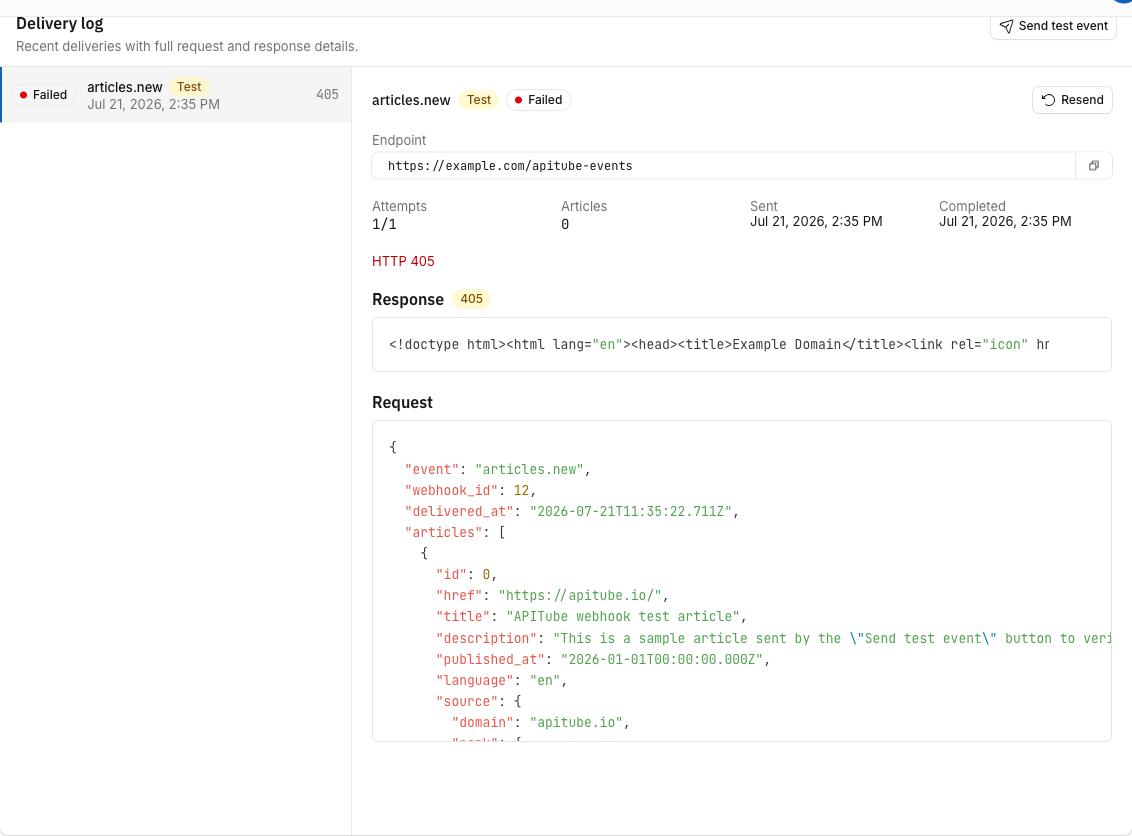
Selecting a delivery shows:
- Attempts — how many tries this delivery has used out of the maximum (e.g.
3/5); the counter rises each time the delivery fails - Articles — how many articles were in the batch
- Created / Completed — when the delivery was queued and when it reached a final state
- Response — the HTTP status code and the raw response body your endpoint returned (stored up to 16 KB)
- Request — the exact JSON payload APITube POSTed (stored up to 64 KB)
- Last error — the failure reason for a failed delivery (for example a timeout or a blocked URL)
The payload your endpoint receives is shaped like this, with the same article fields you get from a news search:
{
  "event": "articles.new",
  "webhook_id": 7,
  "delivered_at": "2026-06-26T12:00:00.000Z",
  "articles": [
    { "id": 123, "title": "...", "source": { "domain": "reuters.com" } }
  ]
}
How to test and re-send a delivery
Two dashboard actions help you debug without waiting for live articles:
- Send test event posts a signed sample payload to your endpoint immediately, bypassing the worker, and records the result (status code, request and response bodies) as a new row in the history. Use it to confirm your endpoint is reachable and your signature verification works.
- Resend re-queues an existing delivery: its status resets to
pending, the attempt counter resets, and the worker picks it up on its next pass. Resend only takes effect while the webhook isactive— re-enable a disabled or paused webhook first.
Common Questions
Am I charged for failed webhook deliveries?
No. Billing happens only for deliveries that actually succeed (your endpoint returned 2xx). Failed attempts do not deduct from your quota. If a delivery fails on the first try and then succeeds on a retry, it is charged once, at the point it succeeds — never per attempt.
Why does a delivery show “failed” with no status code?
A delivery with no HTTP status code means the request never got a response: a connection error, a DNS failure, a 30-second timeout, or a URL blocked by APITube’s safety checks (private or loopback addresses are rejected before sending). The reason appears in the delivery’s last error field. A delivery that returned a code but a non-2xx one (like 500 or 404) will show that code instead.
What happens if the articles are gone by the time a retry runs?
Retries resend the same article IDs from the original batch. If those articles are no longer available when a much-later retry runs, that retry is marked failed with the reason “Articles no longer available for retry.” This is rare in practice, but it is why an endpoint that stays down for hours can end up with permanently failed deliveries even though it eventually came back online — handle deliveries promptly and return 2xx quickly.
How do I stop a webhook from being auto-disabled?
Keep your endpoint returning 2xx quickly. Acknowledge the delivery as soon as you have stored the payload, then do slow work asynchronously — if your handler takes longer than 30 seconds, APITube counts it as a failure, and three failures in a row disable the webhook. A fast 2xx acknowledgement is the single best way to keep deliveries flowing.