
How to Verify Webhook Signatures (HMAC)
Validate the X-Webhook-Signature header with HMAC-SHA256 so you can trust a webhook really came from APITube

Written by Erick Horn
June 26, 2026
Updated July 21, 2026
How to verify webhook signatures (HMAC)
Every APITube webhook delivery is signed so you can confirm it really came from APITube and was not tampered with. To verify it, recompute an HMAC-SHA256 hash over the string timestamp + "." + rawBody using your webhook’s signing secret, prefix it with sha256=, and compare the result to the X-Webhook-Signature header. If they match, the request is authentic; if they do not, reject it with a 401.
POST https://your-app.example.com/webhook
Content-Type: application/json
X-Webhook-Signature: sha256=abc123def456...
X-Webhook-Id: 7
X-Webhook-Delivery-Id: 42
X-Webhook-Timestamp: 1709000000
The signature lives in X-Webhook-Signature, the exact unix-second timestamp that was signed is in X-Webhook-Timestamp, and the body is the JSON APITube POSTed. You need all three plus your secret to verify.
What signature does APITube send?
APITube computes the signature as HMAC-SHA256(secret, timestamp + "." + rawBody) and sends it hex-encoded in the X-Webhook-Signature header, prefixed with the algorithm: sha256=<hex>. The timestamp is the value from the X-Webhook-Timestamp header (unix seconds), and rawBody is the exact bytes of the request body. Each delivery also carries X-Webhook-Id (the webhook subscription ID, which matches webhook_id in the body) and X-Webhook-Delivery-Id (a per-delivery ID that stays stable across retries, useful for deduplication).
The request body is JSON shaped like this, with the same article fields you would get from a news search:
{
  "event": "articles.new",
  "webhook_id": 7,
  "delivered_at": "2026-06-26T12:00:00.000Z",
  "articles": [
    { "id": 123, "title": "...", "source": { "domain": "reuters.com" } }
  ]
}
Where do I get the signing secret?
The signing secret is created together with the webhook and starts with the prefix whsec_. You create webhooks in the dashboard — there is no public POST endpoint to create one over the API — and the secret is shown only once, in the response when the webhook is created. Copy it then and store it like a password (an environment variable, not in client-side code). If you lose it, recreate the webhook to get a new secret. The same secret signs every delivery for that webhook, so your endpoint can verify all of them with one stored value.
How to verify the signature in Node.js
Recompute the HMAC over timestamp + "." + rawBody and compare it to the header in constant time. Verify against the raw request body — the exact bytes you received — not a re-serialized object, because re-running JSON.stringify on a parsed body can produce different bytes and the signature will not match.
import crypto from 'node:crypto';

const MAX_SKEW_SECONDS = 300; // reject deliveries older than 5 minutes (replay protection)

function verifyWebhook(secret, signature, timestamp, rawBody) {
    const age = Math.floor(Date.now() / 1000) - Number(timestamp);
    if (!Number.isFinite(age) || Math.abs(age) > MAX_SKEW_SECONDS) return false;

    const expected = `sha256=${crypto.createHmac('sha256', secret).update(timestamp + '.' + rawBody).digest('hex')}`;
    const received = String(signature || '');

    if (received.length !== expected.length) return false;
    return crypto.timingSafeEqual(Buffer.from(received), Buffer.from(expected));
}

app.post('/webhook', (req, res) => {
    const signature = req.headers['x-webhook-signature'];
    const timestamp = req.headers['x-webhook-timestamp'];
    const rawBody = req.rawBody; // use express.raw / the unparsed body, not JSON.stringify(req.body)

    if (!verifyWebhook(SECRET, signature, timestamp, rawBody)) {
        return res.status(401).send('Invalid signature');
    }

    const { articles } = JSON.parse(rawBody);
    res.status(200).send('OK');
});
How to verify the signature in Python
The Python version follows the same two steps — check the timestamp freshness, then compare an HMAC-SHA256 digest in constant time with hmac.compare_digest.
import hmac
import hashlib
import time

MAX_SKEW_SECONDS = 300  # replay protection

def verify_webhook(secret, signature, timestamp, raw_body):
    try:
        age = int(time.time()) - int(timestamp)
    except (TypeError, ValueError):
        return False
    if abs(age) > MAX_SKEW_SECONDS:
        return False

    expected = 'sha256=' + hmac.new(
        secret.encode(),
        (timestamp + '.' + raw_body).encode(),
        hashlib.sha256
    ).hexdigest()

    return hmac.compare_digest(signature or '', expected)
Common Questions
Why doesn’t my computed signature match?
The most common cause is signing the wrong bytes. The signature covers timestamp + "." + rawBody, where rawBody is the unmodified request body. If your framework parses JSON and you call JSON.stringify again, key order or whitespace can change and the hash will differ. Capture the raw body before parsing (for example express.raw({ type: 'application/json' })), and make sure you concatenate the X-Webhook-Timestamp value with a literal . before the body — not the body alone.
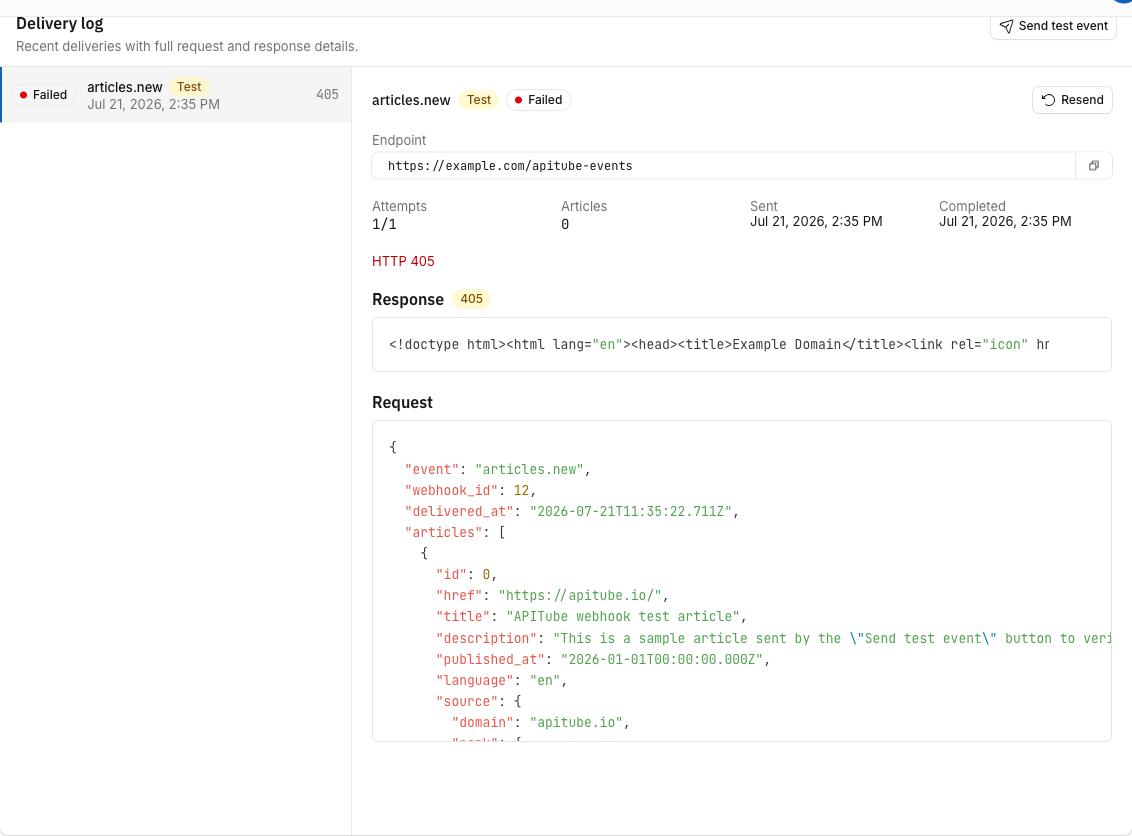
When you debug a mismatch, compare against the exact payload APITube sent: the webhook’s Delivery log in the dashboard stores each delivery’s raw request body, so you can hash precisely those bytes.
Should I reject old webhooks?
Yes. Comparing the X-Webhook-Timestamp against the current time and rejecting anything outside a window — 5 minutes (300 seconds) is a reasonable default — stops a captured request from being replayed later. APITube includes the signed timestamp in every delivery precisely so your endpoint can enforce this. Pair the freshness check with the X-Webhook-Delivery-Id header to deduplicate retries of the same delivery.
Do I need to compare signatures in constant time?
Use a constant-time comparison such as crypto.timingSafeEqual (Node.js) or hmac.compare_digest (Python) rather than ==. A plain string comparison can leak, through timing differences, how much of the signature matched, which weakens the check. Both functions need equal-length inputs, so the Node.js example bails out early when the lengths differ. Because the same whsec_ secret signs every delivery, this verification is the single gate that proves a webhook came from APITube before you act on the articles it carries.