
API key security best practices
Send your key in a header, lock it down with IP, scope and expiry limits, and regenerate it the moment it leaks

Written by Erick Horn
June 28, 2026
Updated July 21, 2026
API key security best practices
Your APITube API key is the single secret that authenticates every request, so treat it like a password: send it in a request header rather than the URL, never embed a live key in browser or mobile code, restrict each key by IP, scope and expiry, and regenerate it immediately if it leaks. Each of these is enforced by the API or available on the API Keys page of your dashboard — this article shows how to combine them.
Send your key in a header, not in the URL
The News API accepts your key three ways and checks them in this order: an Authorization: Bearer token, an X-API-Key header, or an api_key query parameter. All three authenticate the call, but a query parameter travels inside the URL — and URLs routinely end up in browser history, server access logs, and proxy logs, where the secret can be read later. For anything beyond a one-off test, send the key in a header instead:
curl -H "X-API-Key: YOUR_API_KEY" \
  "https://api.apitube.io/v1/news/everything?per_page=10"
For the full mechanics of each method, see how to authenticate your API requests.
Never expose a live key in client-side code
Anyone who can read your page source or a mobile app bundle can copy a key embedded in front-end JavaScript. Call the API from your own backend and keep the key server-side, where visitors can’t reach it. If you need to experiment from a browser, use a test key instead of a live one: test keys (prefix api_test_) return masked, truncated article content and never draw down your quota, so a leaked test key can’t run up your bill. Live keys (prefix api_live_) carry full access and full content — keep them off the client entirely.
Lock each key down with IP, scope and expiry limits
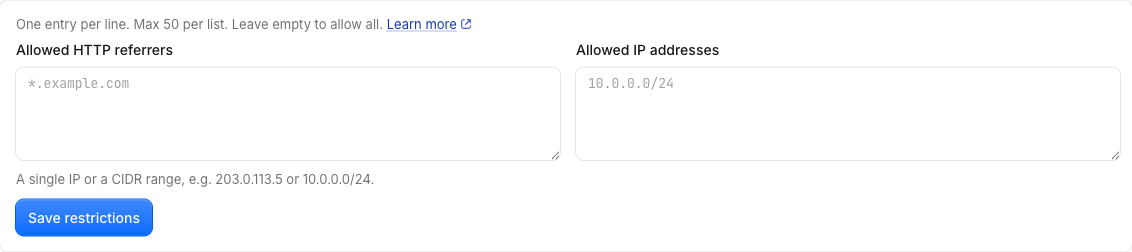
By default a key works from any IP, on any endpoint, with no end date. Tightening those three settings shrinks the damage a leaked key can do, and the API rejects any request that breaks a rule before doing any work:
- IP allowlist (CIDR). Restrict a key to known server addresses or ranges (for example
10.0.0.0/24). A request from a disallowed IP is refused with403ER0601. See how to restrict an API key to specific IPs. - Endpoint scopes. Limit a key to only the endpoints it needs. A key used on an endpoint outside its scopes is refused with
403ER0603. See how to limit an API key to specific endpoints. - Expiry date. Give short-lived keys an end date; after it passes, the key returns
401ER0230. See how to set an expiry date on an API key.
A refused request returns the standard error shape — a status of not_ok, your request_id, and an errors array with the code and message — so your code can detect exactly which rule blocked it.
Use a separate key per app or environment
You can hold up to 20 active keys per mode (Test and Live counted separately) in a workspace, so give each application, script, server and environment its own named key. Because both rate limiting and access checks are keyed on the individual key, one key being throttled or revoked never affects the others — and when something breaks, a per-app key tells you exactly which integration is responsible. Create and name keys on the API Keys page: see how to create, rename and revoke API keys.
Rotate or revoke a key the moment it leaks
If a key is exposed — committed to a repo, pasted in a ticket, shipped in a build — act immediately on the API Keys page:
- Regenerate the key. This issues a brand-new secret in the same mode and invalidates the old value instantly; the next request that uses the old key is rejected with
401. - Revoke any key you no longer use. Revocation is permanent for that key value: the API only authenticates keys that aren’t revoked, so a revoked key stops working on its next request.
Rotating is safer than deleting and recreating because it keeps the same key record (and its name and restrictions) while swapping only the secret.
Common Questions
- Is it safe to put my API key in the URL?
- What happens to requests made with a key after I regenerate it?
- Can my whole team share one API key?
- Are test keys safer to expose than live keys?
Is it safe to put my API key in the URL?
It works — the api_key query parameter is a supported way to authenticate — but it is the least private option. The key becomes part of the URL, which can be saved in browser history, server access logs, and proxy logs. Prefer the Authorization: Bearer token or the X-API-Key header, which are not stored as part of the address. Reserve the query parameter for quick manual tests.
What happens to requests made with a key after I regenerate it?
The old secret stops authenticating immediately. Regenerating replaces the key value, so the next request carrying the old value finds no matching active key and is rejected with 401. Update your applications with the new key before — or right after — you regenerate, and they resume working at once.
Can my whole team share one API key?
You can, but separate keys are safer. With up to 20 active keys per mode, give each person, app or environment its own named key. If one leaks you can regenerate or revoke just that key without disrupting everyone else, and per-key usage and rate limits make it clear which integration is doing what.
Are test keys safer to expose than live keys?
Lower risk, but still keep them private. Test keys return masked, truncated content and do not spend your quota, so a leaked test key can’t drain credits or expose full article bodies. Live keys carry full access, so a live key must never appear in client-side code, public repositories, or shared links.