
How to authenticate your API requests
Send your API key with every request — as a Bearer token, an X-API-Key header, or an api_key query parameter

Written by Kent Hudson
June 28, 2026
Updated July 21, 2026
How to authenticate your API requests
Every request to the APITube News API must carry your API key. You can send it three ways — as an Authorization: Bearer token, in an X-API-Key header, or as an api_key query parameter — and any one of them authenticates the call. The key is the only credential the API needs; there is no separate username, password or login step.
curl -H "Authorization: Bearer YOUR_API_KEY" \
  "https://api.apitube.io/v1/news/everything?per_page=10"
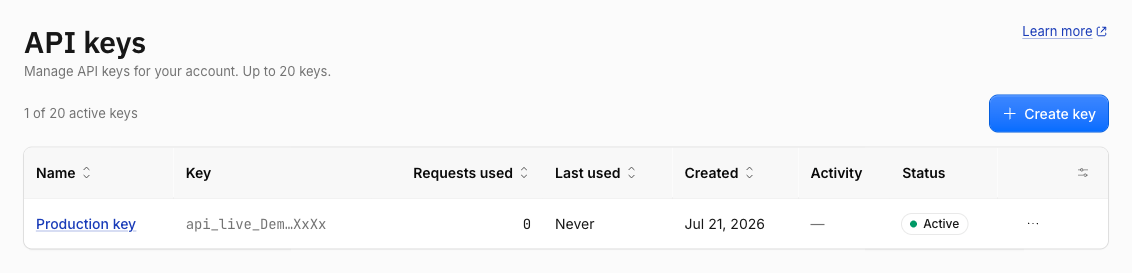
A valid key returns HTTP 200 and your results. If the key is missing or wrong, the API replies with a 401 before doing any work, so authentication is the first thing to get right. New to the API? Start with how to run your first news search, then come back here for every way to pass the key. The key itself is copied from the API Keys page of the dashboard:
How do you send your API key?
There are three accepted ways to attach your key to a request, and the API checks them in this order:
- Authorization header (Bearer) — prefix the key with
Bearer:curl -H "Authorization: Bearer YOUR_API_KEY" \ "https://api.apitube.io/v1/news/everything" - X-API-Key header — send the raw key in a custom header:
curl -H "X-API-Key: YOUR_API_KEY" \ "https://api.apitube.io/v1/news/everything" - api_key query parameter — append the key to the URL:
curl "https://api.apitube.io/v1/news/everything?api_key=YOUR_API_KEY"
If a request includes more than one, the API uses the first it finds in that order: Authorization Bearer, then X-API-Key, then api_key. The same key works on GET and POST requests alike — put your filters in the query string for GET or in a JSON body for POST, and pass the key in a header either way.
Which method should you use?
Use a header — Authorization: Bearer or X-API-Key — for anything running against live data. The api_key query parameter is the quickest way to test from a browser or a one-line curl, but the key then sits in the URL, where proxies, server logs and browser history are likely to record it. For that reason the query-string method is not recommended for production. Pick a header for your servers, and reserve the query parameter for throwaway tests. The header name is case-insensitive, so X-API-Key and x-api-key are treated the same.
What is the difference between live and test keys?
Every account has two kinds of key, and the prefix is the only thing that tells them apart:
- Live keys start with
api_live_. They return full article content and draw down your plan quota or pay-as-you-go balance. - Test keys start with
api_test_. They hit the same live endpoints and return the real response shape, but each article’s body is truncated and suffixed with[Test mode — use a live key for full content], and no quota or balance is spent.
Both kinds authenticate the same way — send them as a Bearer token, an X-API-Key header or an api_key parameter. Use a test key to wire up pagination, field selection and error handling for free, then switch to a live key on a paid plan for full content. If you see placeholder text where the article body should be, you are almost certainly using a test key — see why your results are masked or placeholder text.
What happens when authentication fails?
A rejected key never spends a request — the API turns it away up front. Read the error code in the JSON response to know why:
401 ER0201— no key reached the server (missing header, emptyapi_key=, or a proxy stripped it).401 ER0202— a key was sent but does not match an active key (a typo, extra whitespace, or the key was revoked).401 ER0230— the key is valid but past its expiry date.403 ER0601/ER0602/ER0603— the key works but is blocked by an IP allow-list, a domain restriction, or an endpoint scope.
A 401 is always about the key itself; a 403 means the key is recognised but not permitted for this call. For the exact cause and fix of each one, see how to fix authentication (401) errors. The full credential reference also lives on the official authentication page on docs.apitube.io.
Common Questions
- Do all endpoints require an API key?
- Where do I find or create my API key?
- Can I send the key in a POST body?
- Is authentication different for streaming or webhooks?
Do all endpoints require an API key?
Almost all of them. Every News API endpoint authenticates the same way, with three exceptions that need no key: /ping (a health check), /openapi.json (the API schema) and /robots.txt. Anything that returns news data — search, retrieval, streaming and webhooks — requires a valid key.
Where do I find or create my API key?
Your keys live on the API Keys page of your APITube dashboard. Create an account, open that page, and click Create key; the value starts with api_live_ or api_test_ depending on the mode you are in. You can hold several keys at once and revoke any of them — see how to create, rename and revoke API keys.
Can I send the key in a POST body?
No — the key travels in a header or the query string, not the JSON body. On a POST request you still put your search filters in the body, but the key goes in an Authorization: Bearer or X-API-Key header (or, for a quick test, the api_key query parameter on the URL). This keeps authentication identical across GET and POST.
Is authentication different for streaming or webhooks?
No. The SSE stream, the WebSocket feed and the webhook endpoints all accept the same key in the same three ways, because the key check runs on every request. One practical note: a browser EventSource cannot set custom headers, so for browser-side streaming you pass ?api_key=YOUR_API_KEY on the URL — and because the key is then visible in the page, use a key you have restricted by IP, referrer or scope rather than a privileged one.