
How to run your first news search
Send one request to /v1/news/everything, authenticate with your API key, and read the JSON response

Written by Kent Hudson
June 28, 2026
Updated July 21, 2026
How to run your first news search
To run your first news search, send a request to https://api.apitube.io/v1/news/everything with your API key. With no filters it returns the latest news from across APITube’s index, newest first. The reply is a JSON object whose results field is the array of articles. You can pass the key as an api_key query parameter or as an X-API-Key header — both work.
curl -G "https://api.apitube.io/v1/news/everything" \
  --data-urlencode "api_key=YOUR_API_KEY"
const res = await fetch("https://api.apitube.io/v1/news/everything", {
headers: { "X-API-Key": "YOUR_API_KEY" }
});
const data = await res.json();
console.log(data.results.map(a => a.title));import requests
resp = requests.get(
"https://api.apitube.io/v1/news/everything",
headers={"X-API-Key": "YOUR_API_KEY"},
)
for article in resp.json()["results"]:
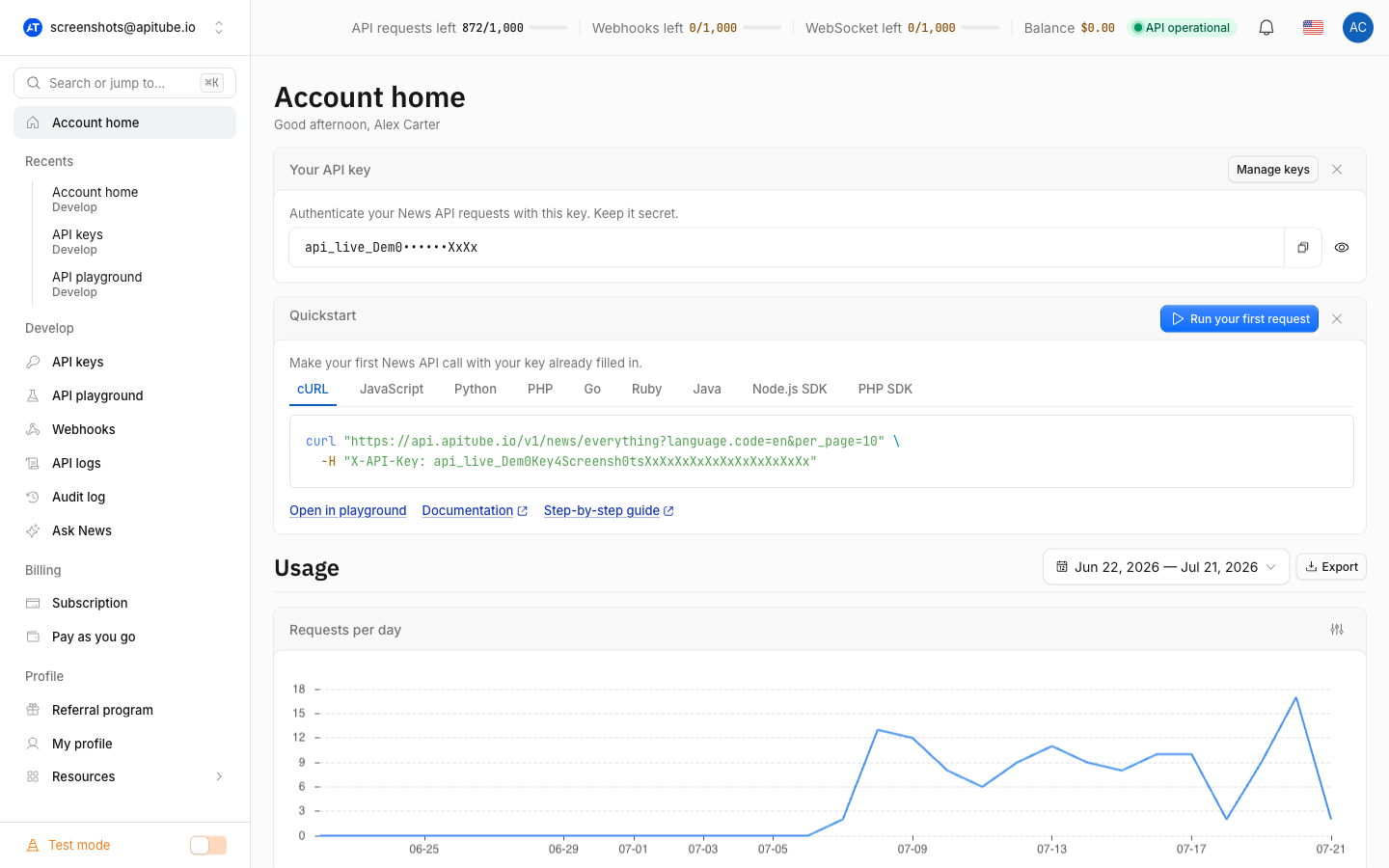
print(article["title"])That single call is enough to get news back. Everything else — keywords, language, date range, sorting — is an optional filter you add on top of this same endpoint. If you prefer not to type the request at all, the Quickstart block on your dashboard home page shows this exact call with your key already filled in:
What is the endpoint and how do you authenticate?
The main search endpoint is /v1/news/everything. Every request must carry your API key, and there are two ways to send it: the X-API-Key request header or the api_key query parameter. The endpoint accepts both GET (parameters in the query string) and POST (parameters in a JSON body), and APITube merges the two, so you can mix them.
curl "https://api.apitube.io/v1/news/everything" \
  -H "X-API-Key: YOUR_API_KEY"
If the key is missing you get HTTP 401 with error code ER0201; if it is not a valid key you get 401 with ER0202. A working key returns HTTP 200 and the JSON envelope described below.
How do you read the response?
A successful search returns a JSON object — an envelope around your articles, not a bare array. The fields you will use first are:
status—"ok"on success.results— the array of article objects (the news itself).pageandlimit— the current page number and how many articles are on it.has_next_pagesandnext_page— whether more results exist and a ready-made URL for the next page.request_id— a unique ID for this call; quote it if you contact support.export— ready-to-use URLs that re-run the same search as CSV, XLSX, RSS, XML, TSV, Parquet, JSONL or JSON.
{
  "status": "ok",
  "page": 1,
  "limit": 100,
  "has_next_pages": true,
  "next_page": "https://api.apitube.io/v1/news/everything?page=2",
  "results": [ "… article objects …" ],
  "request_id": "…"
}
Each item in results is a full article — headline, source, publish date, link, language, and NLP enrichment such as sentiment and detected entities.
How do you narrow your first search?
Add filters as extra parameters on the same /v1/news/everything call. They combine with AND, so each one you add makes the result set smaller and more specific. Common first filters are title (keywords in the headline), language.code (a two-letter language such as en), published_at.start / published_at.end (a date window) and source.domain (one publisher). This request asks for recent English articles mentioning electric vehicles, ten per page:
curl -G "https://api.apitube.io/v1/news/everything" \
  --data-urlencode "title=electric vehicles" \
  --data-urlencode "language.code=en" \
  --data-urlencode "per_page=10" \
  --data-urlencode "api_key=YOUR_API_KEY"
The title filter matches the headline only; for how multi-word matching, synonyms and exact phrases behave, see how to search news by title. The full parameter list is in the official News API parameter reference.
How many articles come back, and how do you get more?
Without per_page, a search returns up to 100 articles per page; the maximum you can request is 250 on Basic and up, 50 on Starter and 10 on Free — and the default drops with the ceiling, so a Free key returns 10 per page. To read beyond the first page, either increment the page parameter (page=2, page=3, …) or follow the next_page URL the response already built for you. The has_next_pages flag tells you when there is nothing left to fetch. To get top headlines instead of a full search, use the top headlines endpoint.
Common Questions
- Where do I get an API key?
- Why is the article text shortened or showing placeholder text?
- Does a search that finds nothing use up a request?
- GET or POST — which should I use?
Where do I get an API key?
Your API key lives in your APITube dashboard. Create an account, open the API keys section, and copy the key into the X-API-Key header or the api_key parameter shown above. You can keep an eye on what each request spends from your quota — see how to check your API balance and remaining quota.
Why is the article text shortened or showing placeholder text?
On a free plan, and with any test key, the long article body is truncated for preview. That is expected: switch to a live key on a paid plan to receive full content. If you see masked or placeholder strings where the body should be, that is the same preview behavior — see why your results are masked or placeholder text.
Does a search that finds nothing use up a request?
No. On /v1/news/everything, a request is only counted against your quota when at least one article is returned. A search that matches zero articles — and any request that fails with a 4xx error — does not spend a request. Test keys never spend quota at all.
GET or POST — which should I use?
Either. GET puts parameters in the query string, which is the quickest way to test from a browser or curl. POST puts them in a JSON body, which is cleaner for long or complex queries. The endpoint accepts both and merges query and body, so the same filters behave identically whichever you choose.