
How to limit an API key to specific endpoints
Use scopes to authorize a key for only the endpoints it needs

Written by Erick Horn
August 22, 2026
Updated July 21, 2026
How to limit an API key to specific endpoints
Scopes let you authorize an APITube API key for only the endpoints it actually needs. You pick the allowed endpoints in your dashboard — at key creation or later on the key’s detail page — and any request to an endpoint outside that list is rejected with 403 and error code ER0603. A key with no scopes set has full access to every endpoint, which is the default.
Scopes follow least-privilege: a key embedded in a public-facing widget can be limited to read-only search, while a server key keeps broader access. If that public key leaks, the damage is capped to the endpoints you allowed.
What are API key scopes?
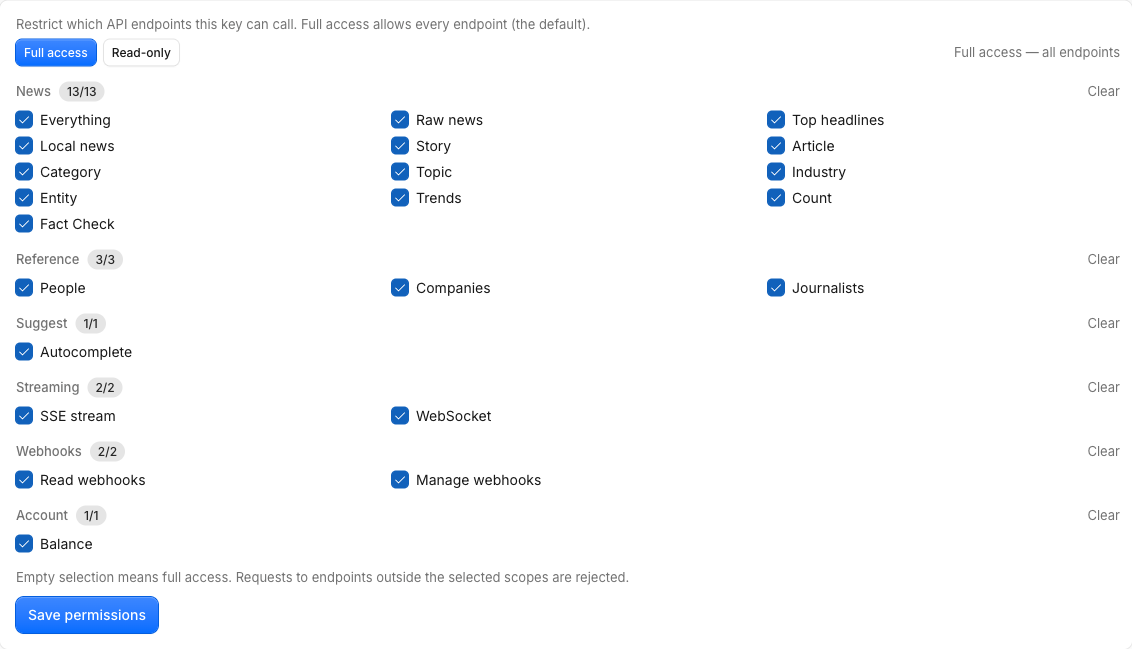
A scope is the permission for one endpoint family. Each scope id matches the request type the News API records for that endpoint, so the name you grant is the same name the API checks on every call. The available scopes are grouped in the dashboard:
- News —
everything,news_raw,top_headlines,news_local,story,article,category,topic,industry,entity,trends,news_count,fact_check - Reference —
people,companies,journalists - Suggest —
suggest - Streaming —
stream,websocket - Webhooks —
webhooks:read,webhooks:write - Account —
balance
For example, the everything scope covers /v1/news/everything, top_headlines covers /v1/news/top-headlines, and article covers /v1/news/article. An empty scope list means the key can call all of them — selecting every scope is treated the same as selecting none (full access).
How to set scopes on a key
You manage scopes in the dashboard; there is no News API call to change them.
- At creation. In the Create key dialog on the API Keys page, choose the scopes alongside the key’s name and expiry.
- On an existing key. Open the key to reach its detail page and use the Scopes form. Two presets speed this up: Full access (every endpoint) and Read-only (everything except modifying webhooks). You can also toggle a whole group or tick individual scopes, then save.
Saving an unknown scope is rejected with 422 Invalid scopes, so you can only grant real endpoints. To create and manage the keys themselves first, see how to create, rename and revoke API keys.
What happens when a key calls a blocked endpoint?
The scope check runs early in request handling, before the endpoint does any work. If the key’s scopes do not include the endpoint, the API returns 403:
{
  "errors": [
    {
      "status": 403,
      "code": "ER0603",
      "message": "Access denied: this API key is not authorized for this endpoint. Required scope: article."
    }
  ]
}
The Required scope field names exactly the scope you would need to add. So a key scoped to only everything and top_headlines works for search and headlines, but a call to /v1/news/article fails with ER0603 until you add the article scope.
A 403 here means the key is recognized but not allowed for this request — different from a 401, which is an authentication failure. If you need to debug a blocked request, why is my request blocked by IP or scope walks through ER0603 (scope) and ER0601 (IP) side by side.
Common Questions
How do webhook scopes work?
Webhooks split by action. A GET request to read webhook configuration needs webhooks:read, while creating, updating, or deleting a webhook needs webhooks:write. The Read-only preset includes webhooks:read but deliberately omits webhooks:write, so a read-only key can inspect webhooks without being able to change them.
What happens if a key has no scopes set?
It has full access. An empty (or absent) scope list means the key can call every endpoint — this is the default for new keys and keeps existing keys working. Add scopes only when you want to narrow a key down; remove them (or pick Full access) to open it back up.
Who can change a key’s scopes?
Workspace owners, admins and members can edit scopes. Viewers cannot — they have read-only access with no key-management permissions. Scopes are checked the same way regardless of how you send the key, whether as an X-API-Key header or an api_key query parameter.
Are scopes the same as an expiry date or IP restriction?
No — they are independent controls you can combine on one key. Scopes limit which endpoints a key may call (ER0603), an IP allow-list limits where it may call from (ER0601), and an expiry date limits how long it stays valid (ER0230). Layer them for tightly scoped, time-boxed access.