
Why is my request blocked by IP or scope?
Fix 403 ER0601 (IP not allowed) and ER0603 (scope not authorized) on your API key

Written by Erick Horn
June 27, 2026
Updated July 21, 2026
Why is my request blocked by IP or scope?
A 403 from the APITube News API means your key is recognized but not allowed for this request. Two restrictions on the key cause it: ER0601 when your IP address is not on the key’s allow-list, and ER0603 when the key’s scopes do not include the endpoint you called. Read the code field in the JSON body to know which one you hit, then fix the matching setting on the key in the dashboard.
{
  "status": "not_ok",
  "request_id": "…",
  "errors": [
    {
      "status": 403,
      "code": "ER0601",
      "message": "Access denied: your IP address is not allowed for this API key.",
      "links": { "about": "https://docs.apitube.io/platform/news-api/http-response-codes" },
      "timestamp": "2026-06-27T12:00:00.000Z"
    }
  ]
}
A 403 is different from a 401. A 401 means the key is missing, invalid or expired; a 403 means the key works but a restriction on it does not match where or how you are calling from. See how to fix authentication (401) errors if you are getting 401 instead.
What does ER0601 (IP address not allowed) mean?
ER0601 means the key has an IP allow-list, and the public IP the API saw for your request is not on it. The API runs behind a proxy with forwarding trusted, so the address it checks is the public egress IP of whatever made the call — your server’s outbound IP, your office gateway, or your proxy — not the private LAN address of your machine. If that IP changed (a new server, a dynamic ISP address, a different cloud region), a previously working key starts returning ER0601.
An empty allow-list means no IP restriction — every address is allowed. So ER0601 only appears when at least one entry is set on the key.
How to fix an ER0601 IP block
Add the IP the API actually sees to the key’s allow-list:
- Find the public IP of the machine making the request (its outbound/egress IP, e.g. via any “what is my IP” service run from that machine — not your laptop if a server sends the calls).
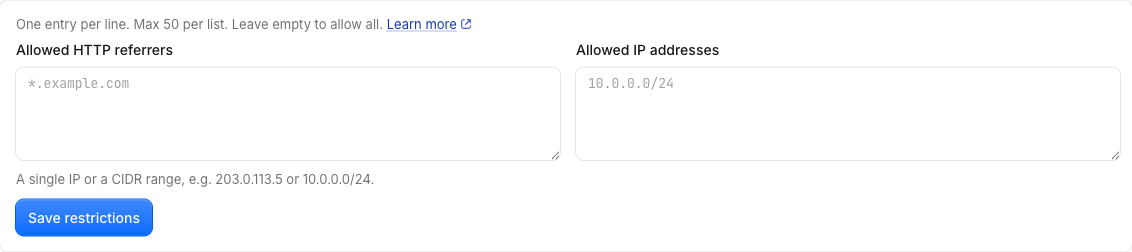
- Open the key in the dashboard under API Keys → your key → API Key Restrictions.
- Add the address to Allowed IP Addresses, one entry per line (up to 50 entries).
Each line can be one of four forms:
- An exact address —
203.0.113.7or an IPv6 address. - A CIDR range —
203.0.113.0/24(IPv4 prefixes/0–/32, IPv6/0–/128). - A prefix wildcard —
203.0.113.*matches every address starting with203.0.113.. *— allow any IP (same effect as leaving the list empty).
To remove the restriction entirely, clear the list and save. The API applies whatever the list contains on the very next request — there is nothing to deploy on your side.
What does ER0603 (scope not authorized) mean?
ER0603 means the key has scopes set, and the endpoint you called is outside them. The message names the scope it needed, for example “Access denied: this API key is not authorized for this endpoint. Required scope: everything.” A scope maps one-to-one to an endpoint’s request type: /v1/news/everything requires everything, /v1/news/top-headlines requires top_headlines, /v1/news/raw requires news_raw, /v1/balance requires balance, and so on. Webhooks split by method: reading a webhook (GET) needs webhooks:read, while creating, editing or deleting one needs webhooks:write.
A key with no scopes set has full access to every endpoint, so ER0603 only appears on keys you deliberately restricted.
How to fix an ER0603 scope block
Either call an endpoint the key is allowed to use, or widen the key’s scopes:
- Read the
Required scopevalue from the403message — that is the exact endpoint the call needs. - Open the key in the dashboard under API Keys → your key → Permissions.
- Either tick that endpoint’s scope, or choose Full access to clear the restriction.
Leaving the Permissions selection empty (or selecting every endpoint) means full access — the key behaves as if no scope filter exists. Keep scopes narrow when a key only powers one feature; widen them when one key serves several endpoints.
Is ER0602 (domain not allowed) related?
Yes. ER0602 is the third member of the same family: it fires when the key has an HTTP referrer allow-list and the request’s Referer/Origin domain is not on it. You set it right next to the IP list, under Allowed HTTP Referrers on the same restrictions panel. The full list of restriction codes lives in understanding API error codes and HTTP responses.
Common Questions
The API saw a different IP than the one I expected — why?
Because the allow-list checks the public address the request arrives from, not your local one. If your app runs on a server, the relevant IP is that server’s outbound IP; if traffic goes through a load balancer, NAT gateway or proxy, it is that hop’s public IP. Browsers and serverless platforms often use rotating egress IPs, which makes a fixed allow-list brittle — prefer a CIDR range or a stable proxy for those.
In what order are these checks run?
The API checks the key in a fixed order: expiry first (a 401 ER0230 for an expired key), then IP (ER0601), then referrer (ER0602), then scope (ER0603). The first failing check wins, so an expired key always returns 401 before any 403 restriction is even evaluated. Fix 401 problems first.
I have both an IP allow-list and scopes — does a request need to pass both?
Yes. The restrictions are independent gates, all applied on every request. A call only succeeds when the IP is allowed and the endpoint’s scope is granted (and the referrer, if a referrer list is set). Loosen whichever gate returned the 403 — the code field tells you which one.