
How to Restrict an API Key to Specific IPs
Lock a key to trusted IP addresses and CIDR ranges

Written by Erick Horn
June 27, 2026
Updated July 21, 2026
How to restrict an API key to specific IPs
An IP allow-list ties an APITube API key to the addresses it is allowed to call from. You add the trusted IPs in your dashboard — at key creation or later on the key’s detail page — and any request from an IP outside that list is rejected with 403 and error code ER0601. A key with an empty IP list has no restriction and works from anywhere, which is the default.
This is server-side protection: if a key with an IP allow-list leaks, it is useless from any machine you did not authorize. It pairs well with endpoint scopes and an expiry date to keep a key tightly locked down.
Where do you set a key’s allowed IP addresses?
You configure IPs in the dashboard; there is no News API call to change them. Open the API Keys page and either create a new key or click an existing key to open its detail page. The API Key Restrictions card has an Allowed IP Addresses box — enter one IP per line (max 50 per list) and click Save Restrictions.
The same field also appears in the Create key dialog, so you can lock a new key down before it is ever used. Leaving the box empty means the key is not IP-restricted.
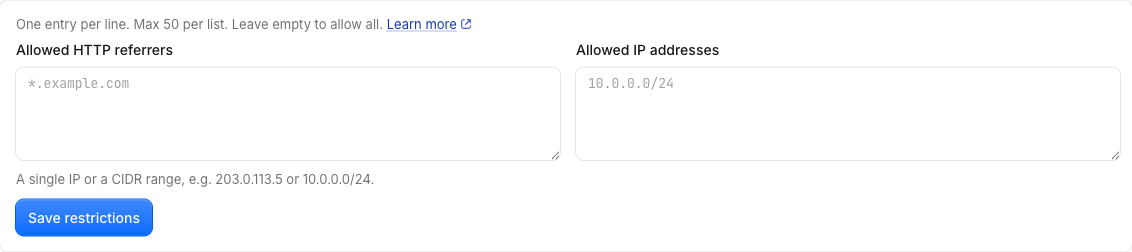
Each entry can be:
- A single IPv4 address, e.g.
203.0.113.20 - A single IPv6 address
- A CIDR range — IPv4
/0–/32or IPv6/0–/128, e.g.10.0.0.0/24 - An octet-prefix wildcard, e.g.
10.0.*(matches any IP starting with10.0.) *on its own, which matches every address (same as leaving the list empty)
The dashboard validates every line against the exact rules the News API enforces, so you can only save entries the API will actually apply. An invalid entry such as 10.0.0.999 disables Save in the form and is rejected server-side with 422 Invalid entries: ….
What happens when a request comes from a blocked IP?
The IP check runs early in request handling — right after the key is confirmed valid and not expired, and before the referrer and scope checks. If the caller’s IP is not in the allow-list, the API returns 403 with ER0601:
{
  "status": "not_ok",
  "request_id": "…",
  "errors": [
    {
      "status": 403,
      "code": "ER0601",
      "message": "Access denied: your IP address is not allowed for this API key.",
      "links": { "about": "https://docs.apitube.io/platform/news-api/http-response-codes" },
      "timestamp": "…"
    }
  ]
}
A request from an allowed IP goes through normally:
curl "https://api.apitube.io/v1/news/everything?title=apple" \
  -H "X-API-Key: YOUR_API_KEY"
The same key sent from an IP outside the list returns the ER0601 body above instead of articles. The check is identical whether you send the key as an X-API-Key header or an api_key query parameter. A 403 ER0601 means the key is recognized but the caller’s location is not allowed — different from a 401, which is an authentication failure. For a side-by-side walkthrough of ER0601 (IP) and ER0603 (scope), see why is my request blocked by IP or scope.
How are IP restrictions different from scopes and expiry?
They are independent controls you can layer on one key. An IP allow-list limits where a key may call from (ER0601), endpoint scopes limit which endpoints it may call (ER0603), and an expiry date limits how long it stays valid (ER0230). A request must pass every restriction that is set, so a call only succeeds when its IP is allowed and its endpoint is in scope. Combine all three for a key that only works from your servers, only hits the endpoints it needs, and stops working on schedule.
Common Questions
Can I restrict a key to a whole network with CIDR?
Yes. Enter a CIDR range like 10.0.0.0/24 (a 256-address block) or 203.0.113.0/28 instead of listing every address. Both IPv4 (/0–/32) and IPv6 (/0–/128) prefixes are supported, and you can mix single IPs, wildcards, and CIDR ranges in the same list — up to 50 entries. A malformed CIDR never matches anything; it is skipped, not treated as an error.
Does the API see the real client IP behind a proxy?
The News API runs with proxy trust enabled, so the IP it checks is the original client address forwarded by the proxy, not the proxy’s own IP. IPv4-mapped IPv6 addresses (::ffff:203.0.113.20) are normalized back to plain IPv4 before matching, so an allow-list entry of 203.0.113.20 still matches. Allow-list the public egress IP your requests actually leave from — your server’s outbound IP or office gateway, not a private LAN address.
Who can change a key’s IP restrictions?
Workspace owners, admins, and members can edit IP restrictions. Viewers have read-only access and cannot — the role is checked on the server, so a viewer is blocked even outside the dashboard UI. To create and manage the keys themselves first, see how to create, rename and revoke API keys.
What if I lock myself out?
Because the list is stored on the key and enforced on every request, you cannot bypass it from the request side. If your server’s IP changes and requests start failing with ER0601, open the key’s detail page and add the new IP (or clear the Allowed IP Addresses box to remove the restriction entirely). The change applies to the next request.