
How to Create and Switch Workspaces
Add a new workspace from the switcher, name it, and move between your workspaces in the APITube dashboard

Written by Brian Hollis
July 3, 2026
Updated July 21, 2026
How to create and switch workspaces
To create a workspace, open the workspace switcher in the dashboard sidebar, choose Create workspace, type a name, and confirm — the new workspace opens right away. To switch, open the same switcher and pick any workspace from the list. Your choice is remembered, so the next time you sign in you land back in the same workspace. You can own up to 10 workspaces, and every account already has one Personal workspace to start from.
How do I create a new workspace?
Creating a workspace takes a few seconds and does not require any billing setup:
- Open the workspace switcher at the top of the dashboard sidebar (it shows your current workspace name).
- Click Create workspace.
- Enter a name — a name is required, and it can be up to 255 characters. Use something you will recognize later, such as a client, project or team name.
- Confirm. APITube creates the workspace and switches you into it automatically, so you can start making API keys there immediately.
The new workspace begins empty: it has its own API keys and its own member list, separate from every other workspace. Because API keys are scoped to each workspace, any keys you had before stay in the workspace where you made them.
How do I switch between workspaces?
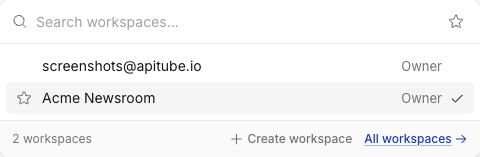
Open the workspace switcher and select the workspace you want. The switcher lists two groups: the workspaces you own, and any workspaces shared with you — ones owned by other people where you are an active member. Each row shows your role in that workspace (owner, admin, member or viewer), and a check mark marks the workspace you are currently in.
Switching changes your active context across the whole dashboard at once: the API keys, request logs, usage and audit log you see all follow the workspace you selected. APITube refreshes this data immediately after you switch, so you are never looking at another workspace’s keys by mistake. Billing, quota and balance are the exception — they belong to the owner’s account and stay the same across all of that owner’s workspaces.
You can also switch from the Workspaces overview page (linked at the bottom of the switcher). That page lists every workspace with its role and API key count; the menu on each row lets you Switch to it, open its Settings (for workspaces you own), or Leave it (for workspaces shared with you).
Your active workspace is saved to your account, not just your browser tab. If a workspace you had selected is later deleted, or your membership in someone else's workspace is removed, APITube quietly falls back to your Personal workspace so you always have a valid context.
How many workspaces can I have?
You can own up to 10 workspaces. Once you reach that limit, the Create workspace button is disabled and the dashboard shows a note that the limit is reached. This ceiling counts only the workspaces you own — workspaces that other people have shared with you do not count toward your 10.
There is also always your Personal workspace: APITube creates it for you automatically the first time you sign in, and it is your default. You cannot delete the Personal workspace, since it is the one that always holds your keys. If you delete a different workspace you own, its API keys are moved back into your Personal workspace rather than lost.
Who can create workspaces and invite people?
Any signed-in user can create their own workspaces — creating one makes you its owner. Inviting teammates into a workspace is separate and more restricted: only the owner or an admin of a workspace can invite members. If you want to build a team inside a workspace, see how to invite team members. For a deeper look at what a workspace is and what is shared versus scoped, read what are workspaces and when to use them.
Common Questions
- Does creating a workspace start a new bill?
- Will switching workspaces log me out or change my settings?
- Do shared workspaces count toward my limit?
Does creating a workspace start a new bill?
No. A new workspace organizes keys and members; it does not create a separate bill or a second quota. Billing, plan, quota and balance belong to the owner’s account and are shared across every workspace that owner has. Creating a workspace only gives you a fresh container for API keys and teammates.
Will switching workspaces log me out or change my settings?
No. Switching only changes which workspace’s keys, logs, usage and members you see. You stay signed in, and personal settings such as your language, theme and profile follow you as an individual — they are not tied to the workspace. Your active workspace is remembered, so you return to it on your next visit.
Do shared workspaces count toward my limit?
No. The 10-workspace limit counts only the workspaces you own. Workspaces that other people own and have shared with you appear in your switcher and let you work inside them, but they never use up one of your own 10 slots.