
How to Invite Team Members to a Workspace
Generate an invite link, pick a role, and add admins, members or viewers to your APITube workspace

Written by Brian Hollis
July 2, 2026
Updated July 21, 2026
How to invite team members
In APITube, a workspace owner or admin invites a teammate from the dashboard: open Workspaces → Team, click Invite, choose a role (admin, member or viewer), and share the generated invite link. Every invite is a link of the form /invite/<token>, so the person you add just needs an APITube account to accept it. Members and viewers cannot invite anyone — the Team page is hidden from them.
Who can invite people to a workspace?
Only the owner and admin can invite. When an admin or owner opens the dashboard, the sidebar shows a Workspaces → Team item; members and viewers do not see it, and the team page returns “not found” if they try to open it directly. This matches the permission model, where inviting, changing roles and removing people are admin-and-owner actions. See workspace roles: owner, admin, member and viewer for the full breakdown of what each role can do.
How to send an invite step by step
Follow these steps in the dashboard:
- In the sidebar, open Workspaces → Team (the page at
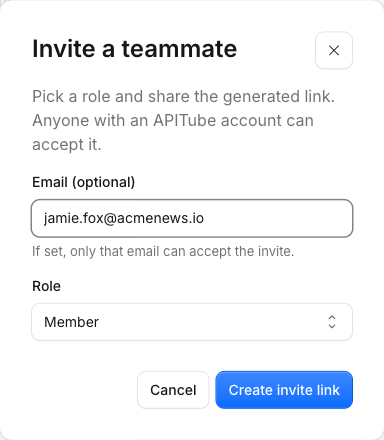
/workspaces/members). - Click Invite to open the “Invite a teammate” dialog.
- Email is optional. Leave it blank to create a link anyone with an APITube account can accept, or enter an address to lock the invite so only that email can accept it.
- Pick a role — Admin, Member or Viewer. Member is the default.
- Click Create invite link. APITube creates a pending invite and shows the link.
- Copy the link and share it. If you entered an email, APITube also emails the link to that address on a best-effort basis; if sending fails, the dialog tells you to copy the link and send it yourself.
The invite you just created appears in the team list with a Pending badge until the person accepts it.
Which role should you give a teammate?
You choose one of three roles when inviting — owner is never an option, so you can promote someone up to admin but never hand out ownership:
- Admin — manages the team and the workspace’s API keys and webhooks. An admin cannot touch billing, the plan, or the owner’s account.
- Member — creates and uses API keys and webhooks and views usage and logs, but cannot invite, re-role or remove people.
- Viewer — read-only access to the workspace’s data.
Keys and members are scoped to the workspace, but quota, balance and billing are shared and belong to the owner, so any key a teammate creates spends the owner’s quota. To manage those keys, see how to create, rename and revoke API keys.
What happens when someone accepts the invite?
The teammate opens the invite link, signs in to their APITube account, and clicks Accept invitation. On success they are added to the workspace and switched straight into it. If you locked the invite to an email, only the account with that exact address can accept — anyone else gets an error. A link-only invite can be accepted by any signed-in APITube user, but only once: after that the invite is used. Nobody can accept an invite into a workspace they already own.
How to change a teammate’s role or remove them
On the Team page, each active member shows a role dropdown — change Admin / Member / Viewer inline (owner and admin only). Revoke cuts a person’s access to the workspace immediately, and revoked people disappear from the list. The same Revoke action cancels a pending invite before it is accepted, so you can withdraw a link you shared by mistake.
Common Questions
- Can a member invite other people?
- Can I invite someone as the owner of the workspace?
- Do teammates share my quota and billing?
- My teammate didn’t get the invite email — what now?
Can a member invite other people?
No. Inviting is limited to the owner and admin. A member can create and use API keys and set up webhooks, but the Team page and the Invite button are not available to them. If you want a teammate to manage the team as well, give them the Admin role.
Can I invite someone as the owner of the workspace?
No. The three invitable roles are Admin, Member and Viewer only — owner is never offered. The owner is fixed to the account that created the workspace, and there is no “transfer ownership” action. To let someone run the team day to day, make them an admin, which grants full member and key management without billing or account access.
Do teammates share my quota and billing?
Yes. A workspace’s API keys and members are its own, but quota, balance and billing are shared and belong to the owner. Every request a teammate’s key makes counts against the owner’s quota, and only the owner sees billing and can change the plan. Admins and members create and use keys, but the checkout and subscription screens stay with the owner.
My teammate didn’t get the invite email — what now?
The email is a convenience, not the invite itself — the invite is the link. If you entered an email and it didn’t arrive, open the Team page, create the invite again (or reuse the link shown at creation), and send the /invite/<token> link directly. A link-only invite (no email) never depends on email delivery at all; you just copy the link and share it.