
Where to find and create your API key
Open the API Keys page in your dashboard, click Create key, and copy the value — it starts with api_live_

Written by Kent Hudson
June 28, 2026
Updated July 21, 2026
Where to find and create your API key
Your APITube API key lives on the API Keys page of your dashboard. Open that page, click Create key, give the key a name, and copy the value — it starts with api_live_ (or api_test_ when you are in Test mode). That single value is the only credential the News API needs; there is no separate username or password.
curl -H "X-API-Key: api_live_YOUR_KEY" \
  "https://api.apitube.io/v1/news/everything?per_page=10"
If this is your very first request, run it once with the key you just copied and you should get HTTP 200 with results. New to the API entirely? Follow how to run your first news search first, then come back to create and manage keys here.
Where is your API key in the dashboard?
Open the API Keys page from the dashboard navigation. It lists every key on your account in a table with columns for Name, Key, Usage points, Last used, Created, a 7-day activity chart, and Status. Each row shows the key value truncated, with a copy icon next to it that copies the full secret to your clipboard at any time — APITube does not hide the value after creation, so you can grab it again whenever you need it.
The first key you created is labelled Default, and any key made without a name shows as Unnamed key. The page header reminds you that an account can hold up to 20 keys, so you can keep separate keys for production, staging, and tests instead of reusing one everywhere.
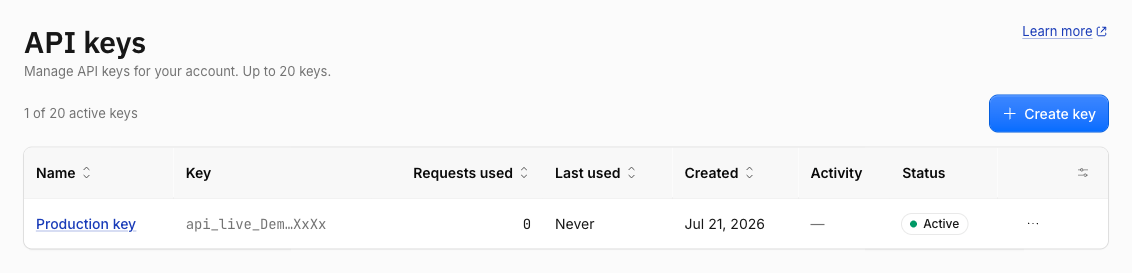
How to create a new API key
- On the API Keys page, click Create key.
- Type a name in the “Create API key” dialog — this field is required, so pick something you will recognize later, like “Production server”.
- Click Create key to confirm.
The new key appears at the top of the table. Its value starts with api_live_ for a live key or api_test_ for a test key — the prefix is the only thing that marks a key’s mode — followed by a long random string. Click the copy icon to grab the full secret and paste it into your app or a request:
curl "https://api.apitube.io/v1/news/everything?api_key=api_live_YOUR_KEY&per_page=5"Keys are created in whichever mode (Test or Live) you currently have selected at the top of the dashboard, and the table shows only the keys for that mode. New accounts start in Live mode by default. For renaming, rotating, and revoking keys later, see how to create, rename and revoke API keys.
Live key or test key — which one do you get?
You can create two kinds of key, and the prefix tells them apart:
- Live keys start with
api_live_. They return full article content and draw down your plan quota or pay-as-you-go balance. - Test keys start with
api_test_. They call the same live endpoints and don’t consume your quota, but each article body is truncated and suffixed with[Test mode — use a live key for full content].
Switch the dashboard between Test and Live mode to create a key of either type. Use a test key to wire up your integration for free, then create a live key for real content. The difference is covered in full in test keys vs live keys.
How do you use the key once you have it?
Send the key with every request. The News API accepts it three ways, and checks them in this order: an Authorization: Bearer token, an X-API-Key header, or an api_key query parameter — any one of them authenticates the call.
# header (recommended for servers)
curl -H "Authorization: Bearer api_live_YOUR_KEY" \
  "https://api.apitube.io/v1/news/everything"

# query parameter (handy for a quick browser test)
curl "https://api.apitube.io/v1/news/everything?api_key=api_live_YOUR_KEY"
Prefer a header for anything running against live data — the query parameter leaves the key in URLs and logs. The full credential reference lives on the official authentication page on docs.apitube.io, and every method is broken down in how to authenticate your API requests.
Common Questions
- Can I see the full key value again after creating it?
- How many API keys can I create?
- Does each key have its own quota?
- Why is one of my keys called “Default”?
Can I see the full key value again after creating it?
Yes. The API Keys table shows every key with a copy icon that copies the complete secret at any time — there is no “you can only see it once” step. Still, treat the value like a password: store it in a secret manager and never embed a live key in browser or client-side code.
How many API keys can I create?
You can hold up to 20 active keys, counted within the current mode, so Test and Live each get their own allowance. Revoked keys don’t count toward the limit, so revoking an old key frees a slot. Trying to create one past the limit returns an error telling you the maximum has been reached.
Does each key have its own quota?
No. Your request quota, balance, and subscription are shared at the account level, not per key. Creating several keys does not give you more requests — every key draws from the same pool. Use multiple keys to separate environments and to rotate or revoke one without disturbing the others.
Why is one of my keys called “Default”?
The dashboard labels your first key Default so it is easy to spot in the table. Any key you create afterwards without typing a name shows as Unnamed key. The label is cosmetic — it doesn’t change how the key authenticates or what it can access. Give each key a clear name when you create it to make auditing and rotation easier later.