
How to Upgrade or Downgrade Your APITube Plan
Change between the Free, Starter, Basic, Professional and Corporate tiers from the Subscription page in your dashboard

Written by Brian Hollis
August 11, 2026
Updated August 9, 2026
How to upgrade or downgrade your APITube plan
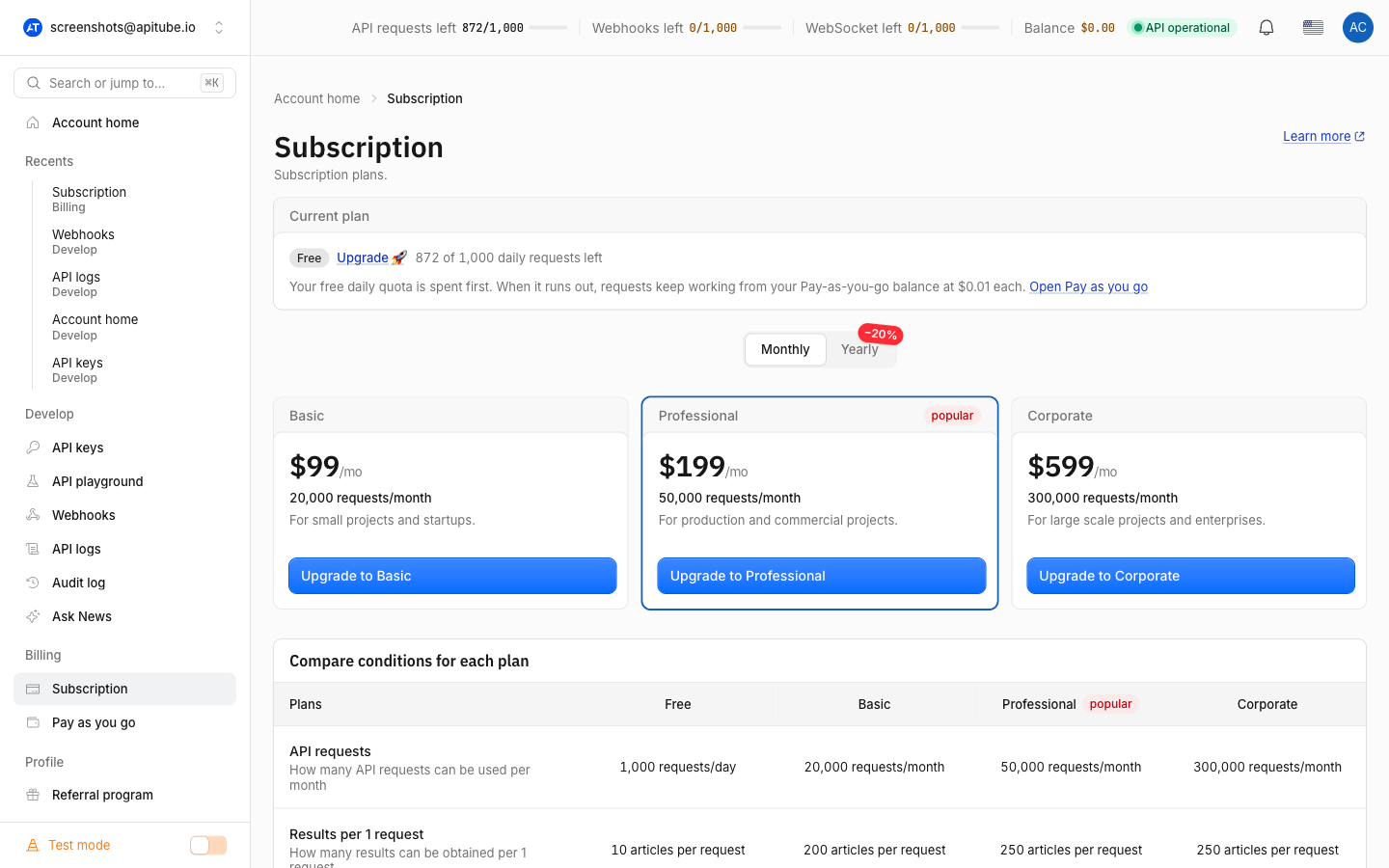
To change your APITube plan, open the Subscription page in your dashboard, pick the tier you want on one of the pricing cards, and click its button. A higher tier shows Upgrade to {plan}, a lower one shows Downgrade to {plan}, and your current tier is shown as a disabled Current plan button. Clicking a plan sends you to the LemonSqueezy checkout to complete the change. Only the workspace owner can switch plans.
APITube has five tiers — Free ($0), Starter ($29), Basic ($99), Professional ($199) and Corporate ($599) per month — and each one sets your request quota, streaming credits, concurrent stream limit and webhook limit. Moving between them is how you get more (or fewer) of those allowances.
How do I change my plan in the dashboard?
The plan change lives entirely on the Subscription page:
- Open the Subscription page from the dashboard sidebar. The Current plan card at the top shows your active tier.
- Scroll to the pricing cards. Four paid tiers are shown as cards — Starter, Basic, Professional and Corporate — each with its price and a button.
- Click the button on the tier you want. Your current tier’s button is disabled and labelled Current plan, so you can only pick a different one.
- You are taken to the LemonSqueezy checkout to enter or confirm payment. LemonSqueezy is the payment provider that processes APITube subscriptions, so every checkout and cancellation happens there, not inside the dashboard.
Once the payment is processed, your plan updates and the Current plan card reflects the new tier. When a paid subscription is active, the card also shows a Renews {date} line so you know when the next billing cycle starts.
What is the difference between upgrade and downgrade?
The button label depends on where the tier you pick sits relative to your current one. APITube orders tiers Free → Starter → Basic → Professional → Corporate. Picking a tier above your current one shows Upgrade to {plan} (for example, Upgrade to Professional); picking one below shows Downgrade to {plan} (for example, Downgrade to Starter). If you are on Free, every paid tier counts as an upgrade.
Both directions go through the same LemonSqueezy checkout — the label just tells you whether you are moving up or down the ladder. Use an upgrade when you are hitting your request or streaming limits and a downgrade when a smaller tier covers your usage. To see exactly what each tier includes before you decide, read compare APITube plans or which APITube plan is right for me.
Should I pick monthly or yearly billing?
Above the pricing cards is a Monthly / Yearly toggle. Switch it before you click a plan to choose the billing cycle:
- Monthly — you are billed each month at the monthly price ($29 Starter, $99 Basic, $199 Professional, $599 Corporate).
- Yearly — you are billed once a year, and the annual price works out lower than paying month by month ($279 Starter, $959 Basic, $1,919 Professional, $4,999 Corporate per year).
The toggle changes which product the plan button points at, so make sure it is set the way you want before checkout. A yearly plan is the cheaper choice if you know you will use APITube for the whole year.
What changes when I switch plans?
Your plan sets four allowances, so switching tiers moves all of them at once:
- Request quota — the number of API requests per cycle (100 per day on Free, 10,000 on Starter, 50,000 on Basic, 150,000 on Professional, 300,000 on Corporate).
- Streaming credits — a separate allowance for the SSE stream.
- Concurrent streams — how many live streams you can hold open at the same time.
- Webhook limit — how many webhooks you can create (1 on Free, up to 100 on Corporate).
The new tier’s allowances are the ones listed for it, so an upgrade raises every limit and a downgrade lowers them. The dashboard reads your current plan and orders from your account, so the Subscription page always shows your live tier and renewal date after a change settles.
Who can upgrade or downgrade the plan?
Only the workspace owner can change the plan. In APITube, quota, subscription and billing all belong to the workspace owner and are shared across that owner’s workspaces, so the pricing cards and billing buttons appear only for the owner. If you are a member, admin or viewer, the Subscription page shows “Billing is managed by the workspace owner” instead of the plan options. Ask the owner to make the change, or switch to your own personal workspace where you are the owner.
How do I move to a lower plan or cancel?
To move to a smaller paid tier, just pick that lower card — it shows Downgrade to {plan} and goes through checkout like any other change. Dropping all the way to Free is different: Free is not something you buy, so there is no Free card to click. Instead, when you have an active paid subscription the Subscription page shows a Cancel button (next to Manage billing); cancelling ends the paid subscription and returns you to the free tier. Both buttons hand off to LemonSqueezy, where the actual cancellation and payment-method changes happen.
The dashboard is where you see and start a plan change; the LemonSqueezy customer portal (reached via Manage billing) is where you download invoices and manage the card on file. See where to find your invoices and billing history for that side of billing.
Common Questions
- Can a team member change the workspace plan?
- Where does checkout actually happen?
- Is yearly billing cheaper than monthly?
- How do I go back to the free plan?
Can a team member change the workspace plan?
No. Changing the plan is limited to the workspace owner, because subscription and billing belong to the owner and are shared across their workspaces. A member, admin or viewer sees “Billing is managed by the workspace owner” on the Subscription page and cannot open the pricing cards. The owner has to perform the upgrade or downgrade.
Where does checkout actually happen?
Inside LemonSqueezy, the payment provider for APITube. The dashboard shows your current plan and the pricing cards, but clicking a plan hands you off to the LemonSqueezy checkout to complete payment. Cancellations and payment-method updates happen there too — the dashboard is where you view billing and start actions, LemonSqueezy is where they are processed.
Is yearly billing cheaper than monthly?
Yes. A yearly plan is billed once a year for less than twelve monthly payments would total — for example Starter is $29/month or $279/year, and Basic is $99/month or $959/year. Set the Monthly / Yearly toggle to Yearly before you click a plan to choose the annual price.
How do I go back to the free plan?
There is no Free card to buy, so returning to Free means cancelling your paid subscription. With an active subscription, use the Cancel button on the Subscription page (shown next to Manage billing); it takes you to LemonSqueezy to cancel. After cancellation your account returns to the free tier and its limits.