
Which APITube plan is right for me?
Match Free, Starter, Basic, Professional or Corporate to your request volume, streaming and webhooks

Written by Brian Hollis
August 22, 2026
Updated August 14, 2026
Which APITube plan is right for me?
Pick your plan by how many requests you make and whether you need real-time delivery. Free (100 requests/day) is for evaluating the API. Starter ($29/mo, 10,000 requests) is the cheapest tier with full article content. Basic ($99/mo, 50,000 requests) suits a small production app. Professional ($199/mo, 150,000 requests) handles serious traffic and heavier streaming. Corporate ($599/mo, 300,000 requests) is for high-volume and multi-team use. If you only sometimes exceed your quota, stay on a smaller plan and let Pay As You Go cover the overflow.
The plans differ on four numbers — how many requests you get, your streaming allowance, how many concurrent streams you can open, and how many webhooks you can run — plus two things that only change at the edges: the rate limit (10 requests per minute on Free, 50 on Starter, Basic and Professional, 200 on Corporate) and a short list of paid-only features noted below. Everything else, including which endpoints you can call, is identical across plans.
How do the APITube plans compare?
| Plan | Price | Requests included | Articles per request | Streaming credits | Concurrent streams | Webhooks |
|---|---|---|---|---|---|---|
| Free | $0 | 100 / day | 10 | 1,000 | 1 | 1 |
| Starter | $29 / mo | 10,000 | 50 | 3,000 | 2 | 5 |
| Basic | $99 / mo | 50,000 | 200 | 5,000 | 2 | 5 |
| Professional | $199 / mo | 150,000 | 250 | 15,000 | 10 | 20 |
| Corporate | $599 / mo | 300,000 | 250 | 40,000 | 50 | 100 |
“Requests included” is your allowance per billing cycle (one request = one credit, and most search and retrieval calls cost a single credit — see what counts as one request). “Streaming credits” is the SSE pool (sse_points), which bills per article delivered. The WebSocket feed and webhook deliveries draw on their own pools (ws_points, webhook_points) that never borrow from it or from your request quota: on Free, Starter and Basic all three match the SSE number, while Professional gets 25,000 WebSocket and 25,000 webhook credits and Corporate gets 100,000 of each. “Concurrent streams” is how many live SSE/WebSocket connections you can hold open at once, and “Webhooks” is how many push subscriptions you can run. “Articles per request” is the per_page ceiling: Professional and Corporate pull 250 articles in one call, Basic 200, Starter 50 and Free 10.
Paid plans renew on a 31-day cycle. The Free plan has a short 1-day validity, so its 100-request daily allowance is sized for testing, not production.
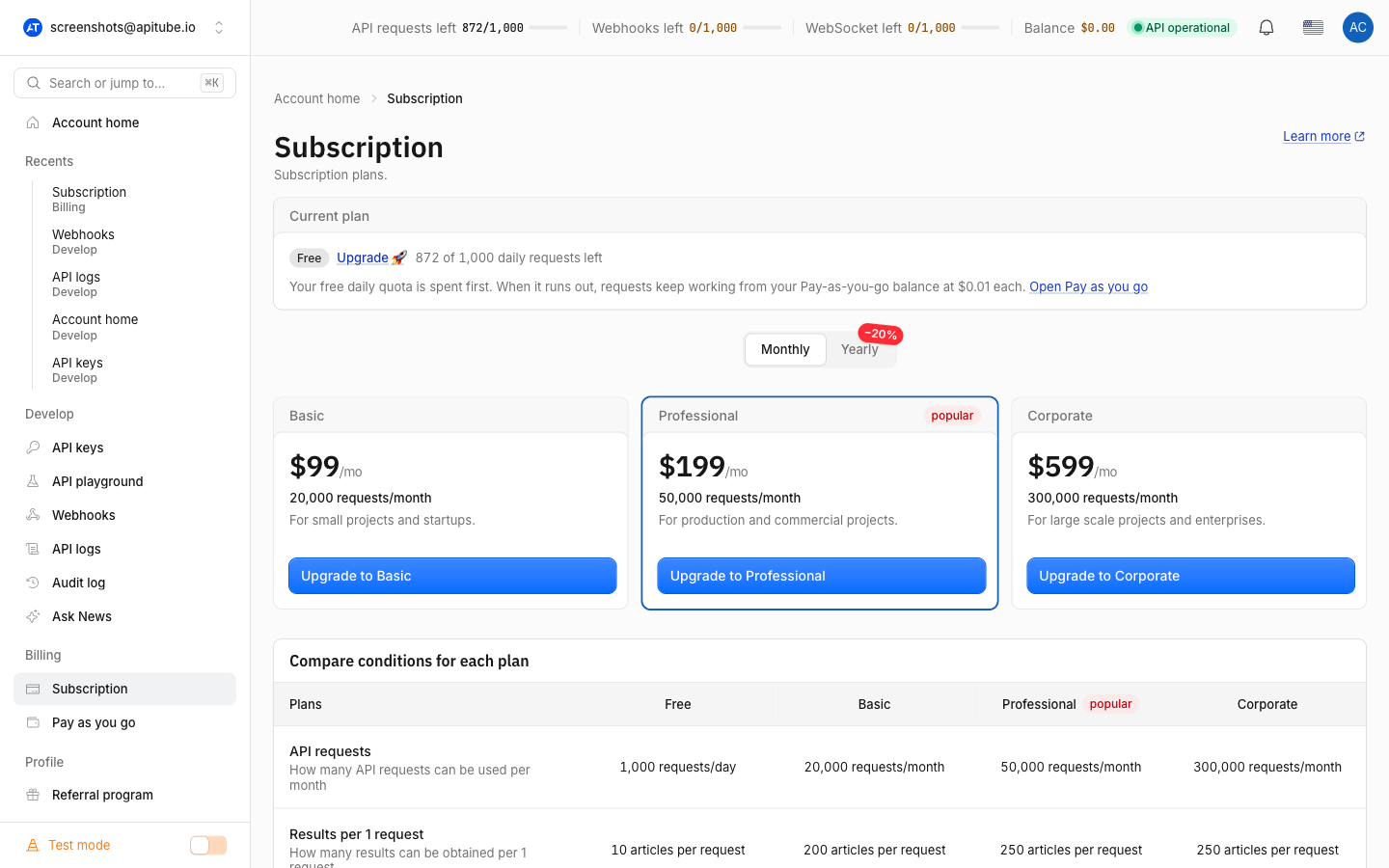
Which plan should you choose?
- Free — choose it to try the API, prototype, or run a tiny side project. You get 100 requests per day, one webhook, and one stream (1 SSE + 1 WebSocket connection, 1,000 deliveries each per day) — but everything arrives with a 12-hour delay, so Free is not a real-time tier. Articles come back complete except for the body text (see below); fact-check, trends, the MCP server and every export format except JSON are off.
- Starter — choose it for the first paid step: 10,000 requests per cycle, 50 articles per request, 3,000 streaming credits, two concurrent streams and up to five webhooks. It carries the same connection and webhook limits as Basic and full article content, so it is the cheapest way off the Free plan’s truncation. The
promptparameter is not part of it. - Basic — choose it for a small but real production workload: roughly 50,000 requests per cycle, 200 articles per request, two concurrent streams and up to five webhooks. It is also the first tier with the natural-language
promptparameter. Good for a single app or dashboard. - Professional — choose it when traffic grows past Basic or you lean on real-time: 150,000 requests, a much larger 15,000 streaming pool, ten concurrent streams and twenty webhooks.
- Corporate — choose it for high-volume pipelines, agencies or multiple teams: 300,000 requests, 40,000 streaming credits, fifty concurrent streams and a hundred webhooks.
A simple rule: size the plan to the request volume you expect in a cycle, then check the streaming and webhook columns cover your real-time needs. If requests are your only concern and you rarely stream, the request count alone decides it.
What is the same on every plan?
Upgrading raises your rate limit only at the top. It is 50 requests per minute on Starter, Basic and Professional, 200/min on Corporate — the Free plan is capped at 10/min and test keys at 15/min — and exceeding it repeatedly triggers a temporary ban. So a higher plan gives you a larger monthly allowance and more streams/webhooks — not a faster burst rate. For the details, see understanding rate limits.
Every plan can call the same endpoints — search, headlines, local, single article, story clusters, count, trends, directories and exports are all routable on every tier. What a plan gates is a short list of features, and they sit at two different heights:
- Fact-check (
/v1/fact-check), Trends (/v1/news/trends), the MCP server and every export format except JSON need Starter or higher. On Free each returns403 ER0706. - Real-time delivery needs Starter or higher: Free is served with a 12-hour delay everywhere, including SSE, WebSocket and webhooks.
- The natural-language
promptparameter needs Basic or higher. On Free and Starter it returns403 ER0706too, before anything is charged. The filters a prompt writes for you are available on every plan if you send them yourself.
Why is article content cut off on the Free plan?
On the Free plan, article bodies are truncated and replaced with an [Upgrade subscription plan] marker instead of the full text. This is intentional: Free is a preview tier, so you can see the structure of every article object — title, source, language, sentiment, entities, dates — but not the complete body. The same truncation applies to test keys. To get full, untruncated article content, move to any paid plan (Starter, Basic, Professional or Corporate) and use a live key. The behaviour is the same idea as test keys vs live keys.
What about annual billing and overflow?
Starter, Basic, Professional and Corporate are also available annually, billed once a year for less than twelve monthly payments — Starter is $279/year, Basic $959/year, Professional $1,919/year and Corporate $4,999/year — with the same request allowance and a larger streaming pool. Annual plans renew every 366 days instead of every 31.
For requests beyond your plan, you do not have to jump to a bigger tier: Pay As You Go tops up an overflow balance at $0.01 per request ($1 = 100 requests). Your plan quota is always spent first, and only overflow draws from the balance — see what is Pay As You Go. This lets a smaller plan absorb the occasional busy day without an upgrade.
Common Questions
- Does a bigger plan give me a higher rate limit?
- What happens when I run out of requests?
- Can I start on Free and upgrade later?
- Do I have to upgrade to handle a traffic spike?
Does a bigger plan give me a higher rate limit?
No. The rate limit is 50 requests per minute on the paid plans (Starter, Basic, Professional and Corporate); the Free plan is capped at 10 per minute. A higher plan increases your total monthly request allowance, streaming credits, concurrent streams and webhook count, but not the per-minute burst rate. If you hit 429 errors, the fix is spacing out requests, not upgrading.
What happens when I run out of requests?
Once your plan allowance for the cycle is spent, the next billed call returns 402 ER0176 unless you have a Pay As You Go balance to cover it. With a balance, overflow requests bill at $0.01 each and keep working. For the full out-of-quota behaviour, see what happens when you run out of requests.
Can I start on Free and upgrade later?
Yes. Free is designed for evaluation, so a normal path is to build and test on Free (with truncated content), then move to a paid plan when you need full article bodies, more requests, fact-check, or more streams and webhooks. Your API keys stay the same; only the plan attached to your account changes.
Do I have to upgrade to handle a traffic spike?
Not necessarily. If you are usually within your plan but occasionally exceed it, Pay As You Go covers the overflow at $0.01 per request, so a one-off busy period does not force a permanent upgrade. Upgrade when your baseline usage consistently sits above your plan’s included requests, not for rare peaks.