
How to top up your balance
Add funds to your Pay As You Go balance from the dashboard in a few clicks

Written by Brian Hollis
June 28, 2026
Updated July 21, 2026
How to top up your balance
To top up your Pay As You Go balance, open the Pay As You Go page in your APITube dashboard, choose a preset amount (from $10 to $500) or type any custom amount between $1 and $10,000, then complete the secure checkout. Your balance is credited as soon as payment clears, and every dollar buys 100 requests because one request costs $0.01. Only the workspace owner can top up, since the balance is shared across the whole workspace.
Where do you top up your balance?
Top-ups happen on the Pay As You Go page of the dashboard — the same page that shows your current balance and your monthly spending limit. The page gives you two ways to pick an amount:
- Preset buttons — $10, $25, $50, $100, $250 and $500, with $50 selected by default. Each button shows how many requests that amount buys.
- Custom amount — a dollar field where you can enter any whole-dollar value from $1 to $10,000. Amounts outside that range are rejected before checkout.
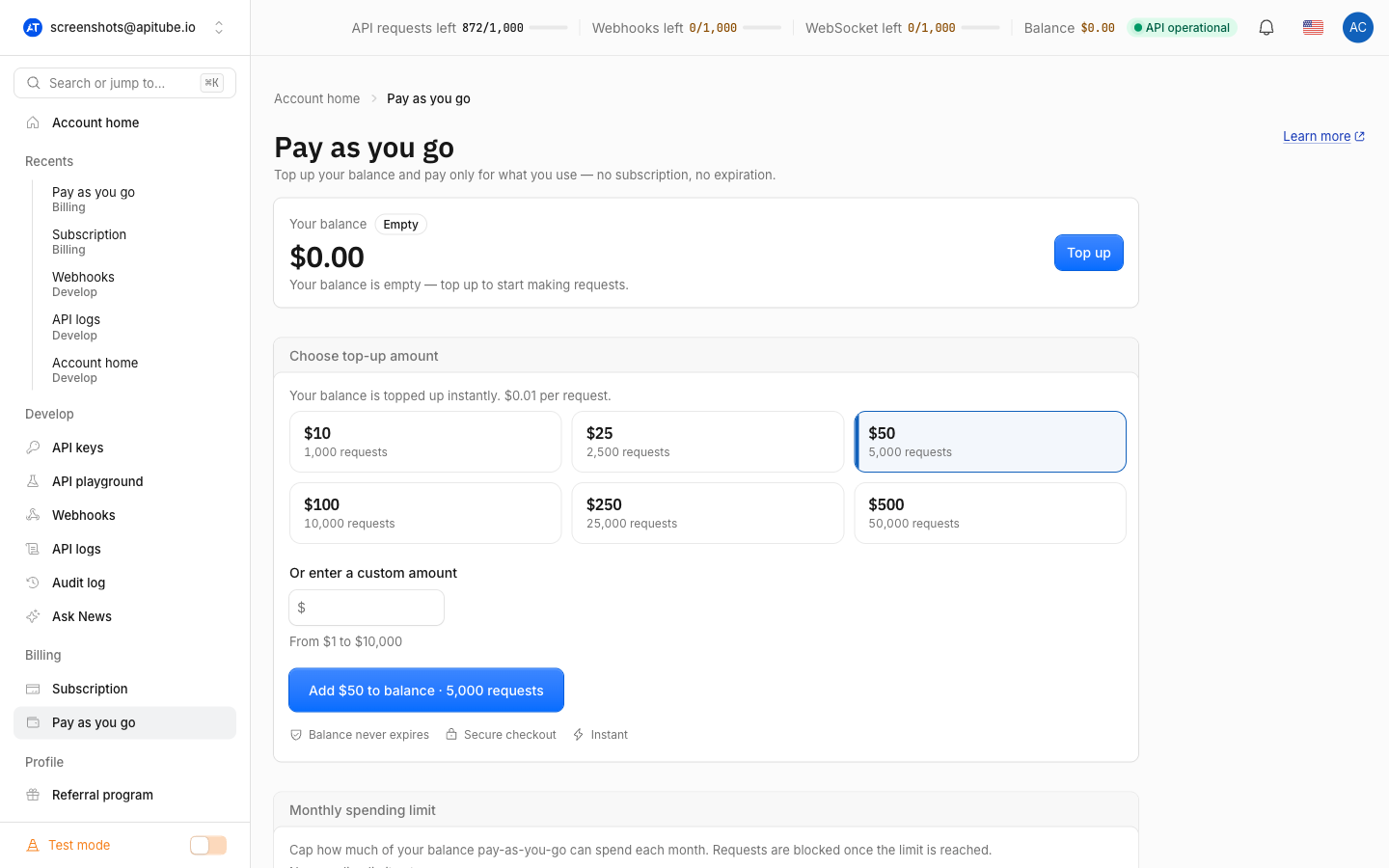
Because one request costs one cent, the request count scales directly with the dollars you add:
| Top-up | Requests |
|---|---|
| $1 (minimum) | 100 |
| $10 | 1,000 |
| $50 | 5,000 |
| $100 | 10,000 |
| $500 | 50,000 |
| $10,000 (maximum) | 1,000,000 |
For how that balance is spent once you start calling the API, see What is Pay As You Go?.
How does the top-up checkout work?
When you confirm an amount, the dashboard hands you off to a secure hosted checkout — APITube never collects card details itself. The amount you picked is carried to the payment flow as a dollar value (for example, the dashboard opens …/topup/create?amount_dollars=50), which creates a checkout for exactly that price and sends you to the payment page. Once payment clears, you are returned to the Pay As You Go page and your balance reflects the new funds.
There is nothing else to switch on after a top-up. The balance simply waits in your account, and the very next request that exceeds your monthly plan quota draws from it automatically — at the same $0.01 per request.
Who can top up the balance?
Only the workspace owner can add funds. A Pay As You Go balance is shared across every workspace the owner runs, and billing is tied to the owner’s account, so the top-up form only appears for the owner. Admins, members and viewers instead see a note that the balance is managed by the owner and cannot start a top-up. If you need more balance and you are not the owner, ask the workspace owner to top up.
How much does each request cost from the balance?
Each billed request deducts $0.01 (one cent) from your balance, and your plan quota is always spent first — the balance only covers overflow once your monthly quota is used up. That makes the balance easy to read as a request count: $5.00 left means 500 requests left. When both your quota and your balance reach zero, the next call returns 402 ER0176 (“You have no points on your account”) instead of doing work. To stop overflow before it drains the whole balance, set a monthly spending limit.
How do you check your balance after topping up?
Every API response returns your remaining balance in the x-balance-remaining header, expressed in cents — so a value of 500 means $5.00, or 500 requests left. You can also poll the /v1/balance endpoint at any time to read your balance and plan without spending a request. See how to check your balance via the API for the exact call.
Common Questions
What are the minimum and maximum top-up amounts?
The minimum top-up is $1 (100 requests) and the maximum is $10,000 (1,000,000 requests) in a single transaction. The custom field enforces this range, and any amount outside it is rejected before you reach checkout.
Does my balance expire after I top up?
No. Your Pay As You Go balance never expires — it stays in your account until you spend it on API requests, whether that takes days or months. Topping up does not start a subscription or a renewal clock; the funds simply wait until a request needs them.
Can I get a refund for an unused balance?
Your balance is non-refundable, but it never expires, so any unused funds stay available for future requests. If you mostly need a predictable monthly allowance rather than overflow, compare a subscription plan instead.
Do I need a subscription to top up?
No. You can hold a Pay As You Go balance without a paid monthly plan, and eligible requests are billed to it at $0.01 each. On a monthly plan, the balance acts purely as overflow: your included quota is spent first, and top-ups only cover requests beyond it.