
How to update your profile and avatar
Change your name, email address and profile picture on the APITube dashboard — and what happens to your session when you do

Written by Brian Hollis
July 3, 2026
Updated July 6, 2026
How to update your profile and avatar
To update your profile, open your Account page — it lands on the Profile tab — and edit the fields on the profile card. You can change your display name, your email address, and your avatar (profile picture). Each field is saved on its own, so updating your name does not touch your email, and uploading an avatar does not touch either. Changes take effect right away.
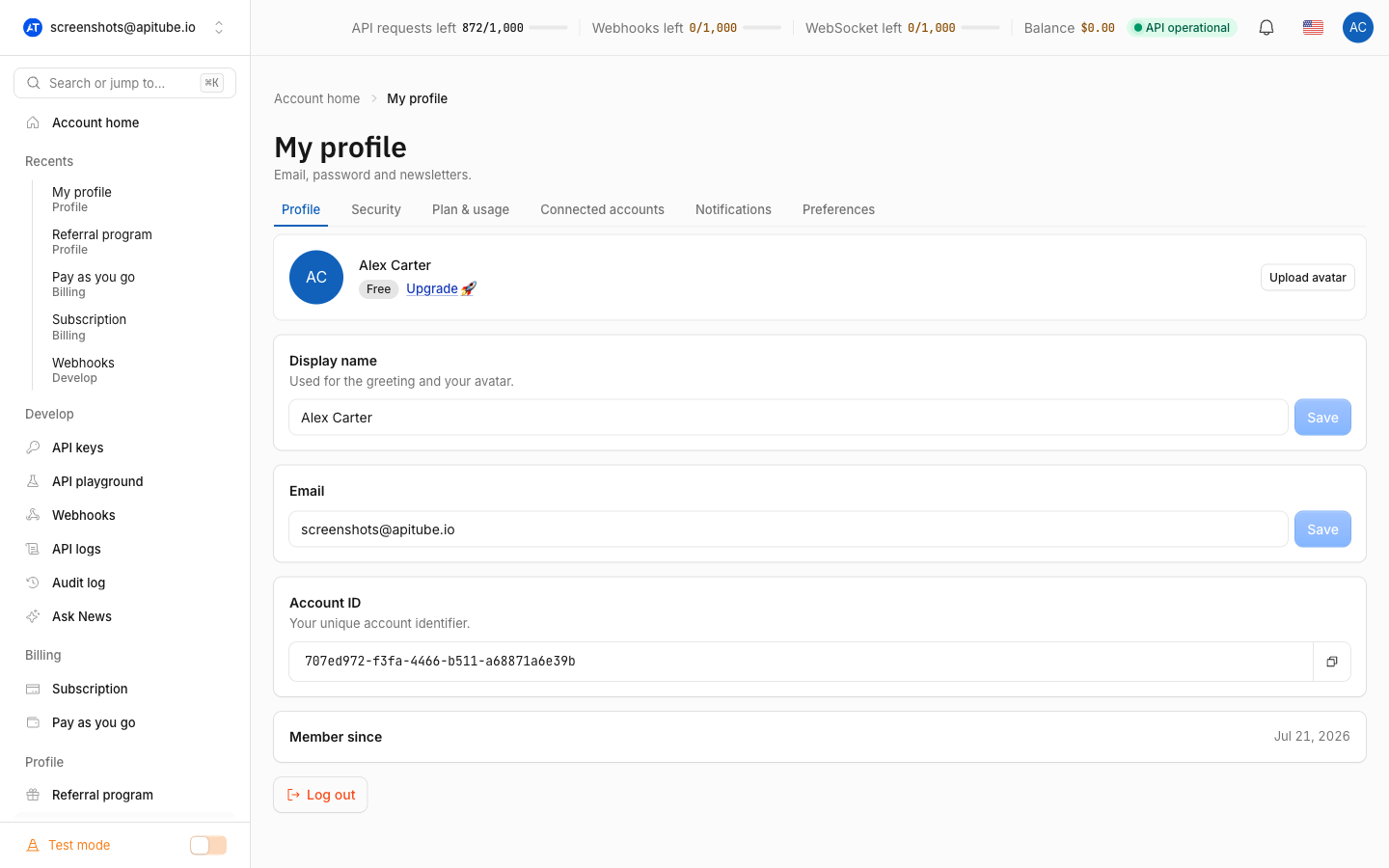
Your name and email are stored on your account, so they follow you to every device and browser. The dashboard theme and language, by contrast, are saved only in the current browser.
How do I change my display name?
Edit the name field on the Profile tab and save it. The name is used across the dashboard — it appears in the header and as the label on your avatar — and it is trimmed and capped at 120 characters, so anything longer is shortened when saved. The name is separate from your login: changing it does not affect how you sign in, your API keys, or your quota. If you clear the name entirely, the dashboard falls back to showing your email address instead.
How do I change my email address?
Edit the email field and save it. The address is checked for a valid format, and it must be unique — if the new email is already used by another APITube account, the save is rejected with a 422 error (“This email already exists.”) and your current email stays unchanged. When the new address is free, it is updated immediately. Your email is your account’s identity, so keep it current: it is where account and (if enabled) notification mail is sent. Toggling which emails you receive is a separate setting on the account page, not part of the profile fields.
How do I upload or change my avatar?
Use the avatar control on the Profile tab to pick an image file. APITube processes every upload the same way, so you do not need to crop or resize first:
- File type — any image format. The file is re-encoded on the server, which also rejects anything that is not a real image.
- Maximum size — 5 MB. Larger files are rejected before upload.
- Output — the image is cropped to a centered square and saved as a 256×256 WebP, and it is auto-rotated using its orientation data so sideways phone photos come out upright.
Once processed, the avatar shows immediately in the header and on the Profile card. Because the stored file is a small square WebP, it loads fast anywhere the dashboard shows your picture.
How do I remove my avatar?
Remove the current picture from the same avatar control. After removal, the dashboard falls back to an initials avatar — a colored circle showing the initials taken from your name (or your email if you have no name set). There is no “default photo” to restore; removing the avatar simply returns you to initials, and you can upload a new image at any time.
Does changing my profile log me out?
Changing your name, email or avatar does not end your session — you stay signed in. Changing your password is different: for security, saving a new password rotates the credential your browser uses to stay logged in, which signs you out, so you will need to log back in with the new password afterward. That is the same mechanism behind signing out everywhere — see how to sign out of all devices if you want to force a fresh login on every browser.
Common Questions
- Where do I edit my profile?
- Why was my new email rejected?
- What are the avatar size and format limits?
Why was my new email rejected?
The most common reason is that the address is already tied to another APITube account. The dashboard checks the new email for uniqueness and returns a 422 error if it is taken, leaving your existing email in place. The other reason is format: the address must look like a real email (a name, an @, and a domain). Fix the address or use one that is not already registered, then save again.
What are the avatar size and format limits?
The upload accepts any image format up to 5 MB. Whatever you send is converted to a 256×256 WebP square, cropped to center and auto-rotated, so aspect ratio and orientation are handled for you. Very large images (by pixel dimensions, not just file size) are rejected as a safety measure, but any normal photo or logo is well within the limit.
Do profile changes affect my API usage?
No. Your name, email and avatar are account details for the dashboard. They do not change your API keys, your request quota, your billing, or anything about how the News API responds. The only profile-area action that touches your session is a password change, which signs you out so you re-authenticate. To personalize the interface itself instead, change the dashboard language or theme.