
How to sign out of all devices
End every active dashboard session at once — without touching your API keys

Written by Brian Hollis
July 3, 2026
Updated July 21, 2026
How to sign out of all devices
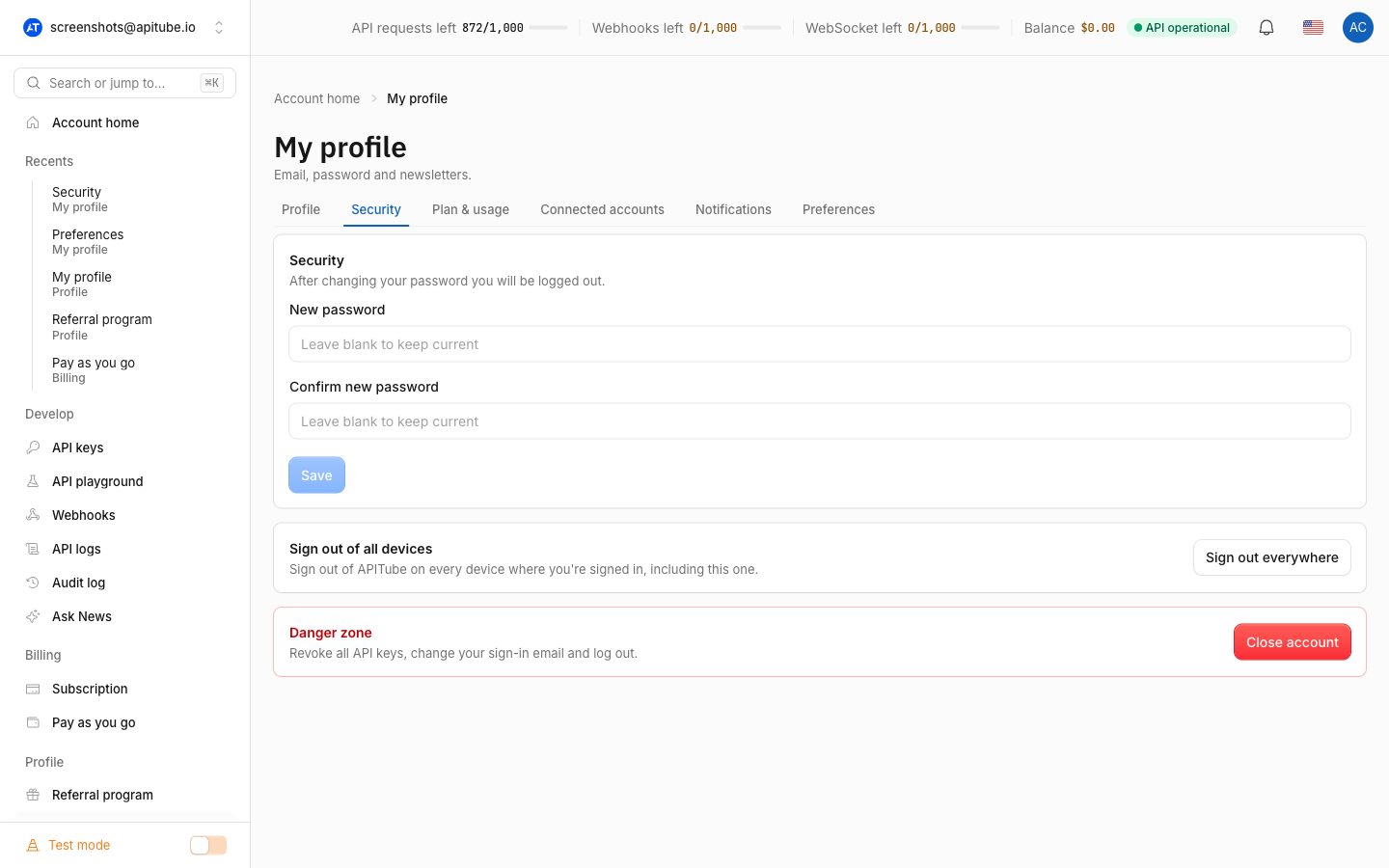
To sign out of APITube everywhere, open the dashboard, go to Account → Security, and click Sign out everywhere. Confirm in the dialog, and every device where you’re signed in — including the one you’re using right now — is signed out at the same time, so you’ll need to sign in again. Your API keys are not affected and keep working.
Signing out of all devices ends your dashboard login sessions only. It does not revoke, regenerate or change your API keys. Any app or integration that authenticates with an API key keeps running.
Where is the sign out everywhere button?
The button is on the Security tab of your Account page, inside the “Sign out of all devices” card. Click Sign out everywhere, then confirm the dialog — it warns that “This will sign you out on all devices, including this one. You’ll need to sign in again.” Once it runs, the dashboard returns you to the sign-in screen.
Reach for this whenever you’ve signed in on a shared or public computer, misplaced a laptop or phone, or suspect someone else has access to your account. It is the fastest way to cut off every open session in one step.
Does signing out everywhere delete my API keys?
No. Signing out of all devices ends your login sessions, not your keys — it does not revoke, regenerate or change any API key, and integrations that send those keys to the News API keep working. The two are separate things: your login is how you get into the dashboard, while an API key is what your code sends with each request.
If your real goal is to cut off a leaked or exposed API key rather than your login, revoke or regenerate that specific key instead — see How to Create, Rename and Revoke API Keys. The only action that revokes every key at once is closing your account, which is a separate, more drastic step.
Can I sign out of just one device?
No. The dashboard does not show a list of active sessions or individual devices, so signing out is all-or-nothing: one click on Sign out everywhere ends every session at the same time. There is no separate “sessions” screen for signing out a single browser or phone while leaving the others.
This works the way it does because APITube recognises your login with a single session token that is shared across all your devices. Signing out everywhere refreshes that token, which instantly invalidates the old sessions on every browser and device you were using.
Does changing my password sign me out too?
Yes. Changing your account password — also on the Account → Security tab — resets the same login session, so it signs you out of every device just like Sign out everywhere does. After you set a new password the dashboard reloads and asks you to sign in again on this device, and any other signed-in devices are logged out as well.
If you think your password has leaked, change it: that both blocks the old password and ends every existing session in one move. For keeping your API access safe (which is separate from your login), read API key security best practices.
Common Questions
- Where is the sign out everywhere button?
- Does signing out everywhere delete my API keys?
- Can I sign out of just one device?
- Does changing my password sign me out too?
Will I lose any data or settings when I sign out?
No. Signing out of all devices only ends your active login sessions. Your API keys, request logs, saved preferences, workspaces and billing are all untouched — signing back in returns you to exactly the same account. The only thing you lose is the “already signed in” state on each device, which you restore by logging in again.
Does this sign out my team members too?
No. Signing out everywhere applies only to your own account and your own devices. Other members of a shared workspace have their own separate logins, so they stay signed in. Removing someone else’s access is a different task handled from your team settings, not from the sign-out button.