
How to change the dashboard language
Switch the APITube dashboard interface to any of its 13 languages, and where the choice is saved

Written by Brian Hollis
July 3, 2026
Updated July 21, 2026
How to change the dashboard language
To change the APITube dashboard language, click the flag button in the top bar and pick a language, or open Account → Preferences and use the Language control. The interface switches straight away — there is no save button and no manual reload — and your choice is saved in your browser. The dashboard ships in 13 languages, and a brand-new account is shown in the language your browser asks for, falling back to English.
The dashboard language changes only the interface — menus, labels and buttons. It does not change the language of the news articles you get from the API. That is a separate filter, language.code, on your API requests.
Where do I change the dashboard language?
The language switch lives in two places, and both open the same menu:
- Header flag button (fastest). Look at the top bar of the dashboard, near the notification bell and your avatar menu. There is a small flag button — click it and a dropdown lists every language with its flag and native name. Pick one and it applies immediately.
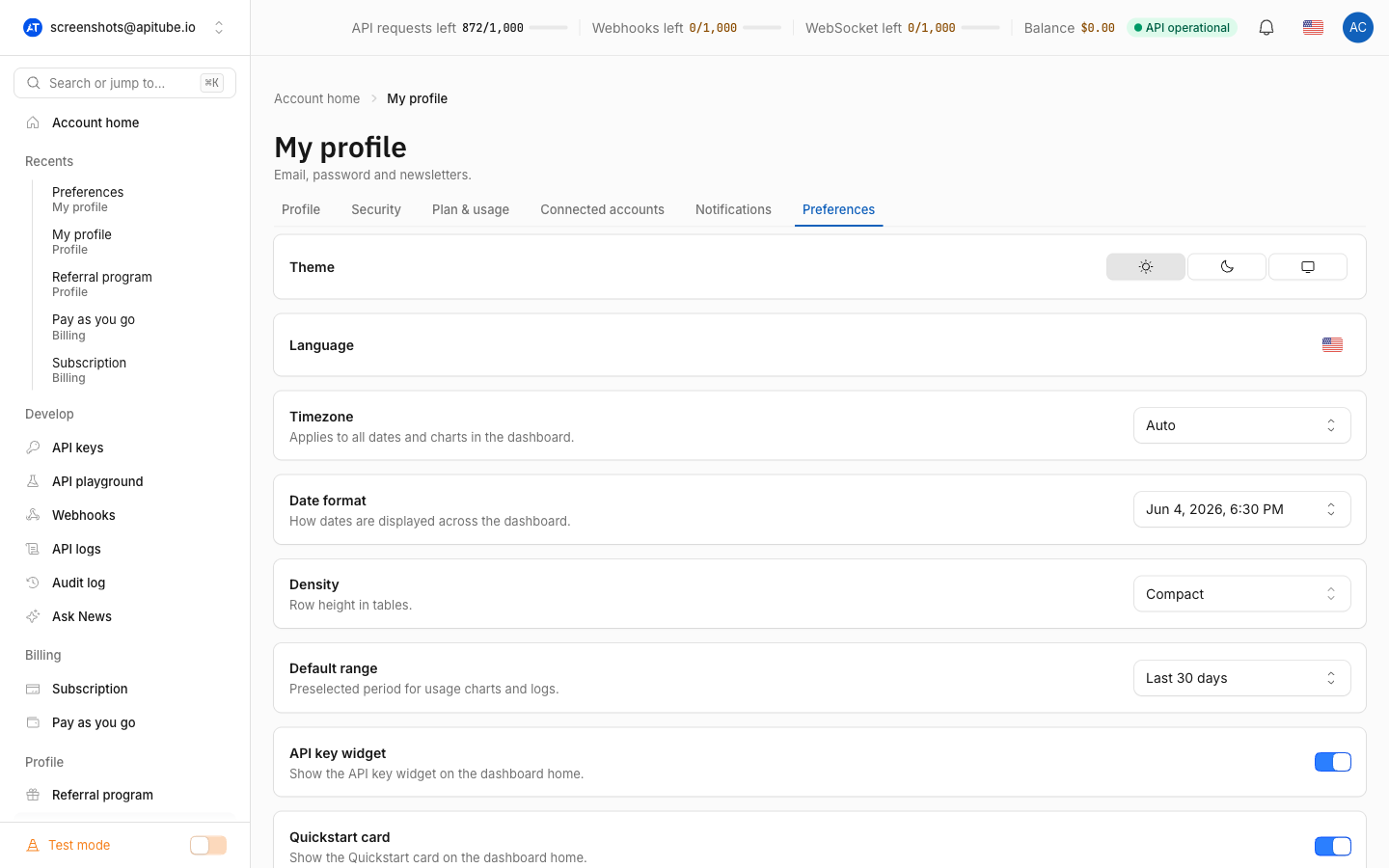
- Account → Preferences. Open your Account page and select the Preferences tab. The Language row sits alongside Theme and Timezone, and holds the same switch.
Either way, selecting a language runs instantly and refreshes the page in the new language. You do not confirm or save anything.
Which languages can I choose?
The dashboard interface is available in 13 languages, each listed by its native name:
- English
- Deutsch (German)
- Español (Spanish)
- Français (French)
- Italiano (Italian)
- Nederlands (Dutch)
- Português (Brasil) and Português (Portugal) — two separate Brazilian and European Portuguese options
- 日本語 (Japanese)
- 中文 (Chinese)
- ไทย (Thai)
- Svenska (Swedish)
- Dansk (Danish)
English is the default and the fallback used when no other match is found.
Does changing the dashboard language change my search results?
No. The dashboard language only translates the dashboard interface. Which language the news articles come back in is controlled separately, by the language.code parameter on your API requests. For example, to get English articles you pass language.code=en, regardless of what language your dashboard is displayed in:
curl "https://api.apitube.io/v1/news/everything?language.code=en&api_key=YOUR_API_KEY"So you can run the dashboard in Japanese while pulling German articles, or vice versa — the two settings are independent. See How to filter news by language for how to restrict the API results themselves.
Where is my dashboard language saved?
Your language choice is stored as a cookie in your browser, and it lasts for about a year. It is not saved on your account, so it does not follow you to another computer or browser — much like the dashboard theme, which is also browser-local. If you clear your browser’s cookies, the language resets.
When you have no saved choice yet — a new account, a new browser, or after clearing cookies — the dashboard reads your browser’s Accept-Language header and picks the closest match from the 13 supported languages. If none match, it shows English.
Common Questions
- Why was the dashboard already in my language before I changed it?
- Does my language choice sync across devices?
- I switched the language but the news is still in English — why?
- How do I switch back to English?
Why was the dashboard already in my language before I changed it?
On your first visit, before you have picked anything, the dashboard reads your browser’s Accept-Language header and matches it to one of the 13 supported languages. So if your browser is set to French, the dashboard starts in French without you doing anything. When it can’t match your browser language, it falls back to English.
Does my language choice sync across devices?
No. The language is saved as a cookie in the browser you set it in, so it does not travel to another computer, another browser, or a private/incognito window — those start from the browser-detected language again. Set the language once in each browser you use and it will stick there for about a year.
I switched the language but the news is still in English — why?
Because the dashboard language and the article language are two different settings. Changing the dashboard language only translates the interface. The language of the articles you receive is set by the language.code filter on the request — for example language.code=fr for French news. Adjust that parameter (or the equivalent control in the Playground) to change the article language.
How do I switch back to English?
Open the flag button in the top bar or the Language row under Account → Preferences, and choose English. It applies immediately, the same as any other language. Clearing your browser cookies also resets the dashboard to your browser-detected language, which is English if nothing else matches.