
How Billing and Usage Are Shared in a Workspace
One owner pays and holds the quota; every workspace they own draws from the same shared pools, while API keys stay per-workspace

Written by Brian Hollis
August 11, 2026
Updated July 12, 2026
How billing and usage are shared in a workspace
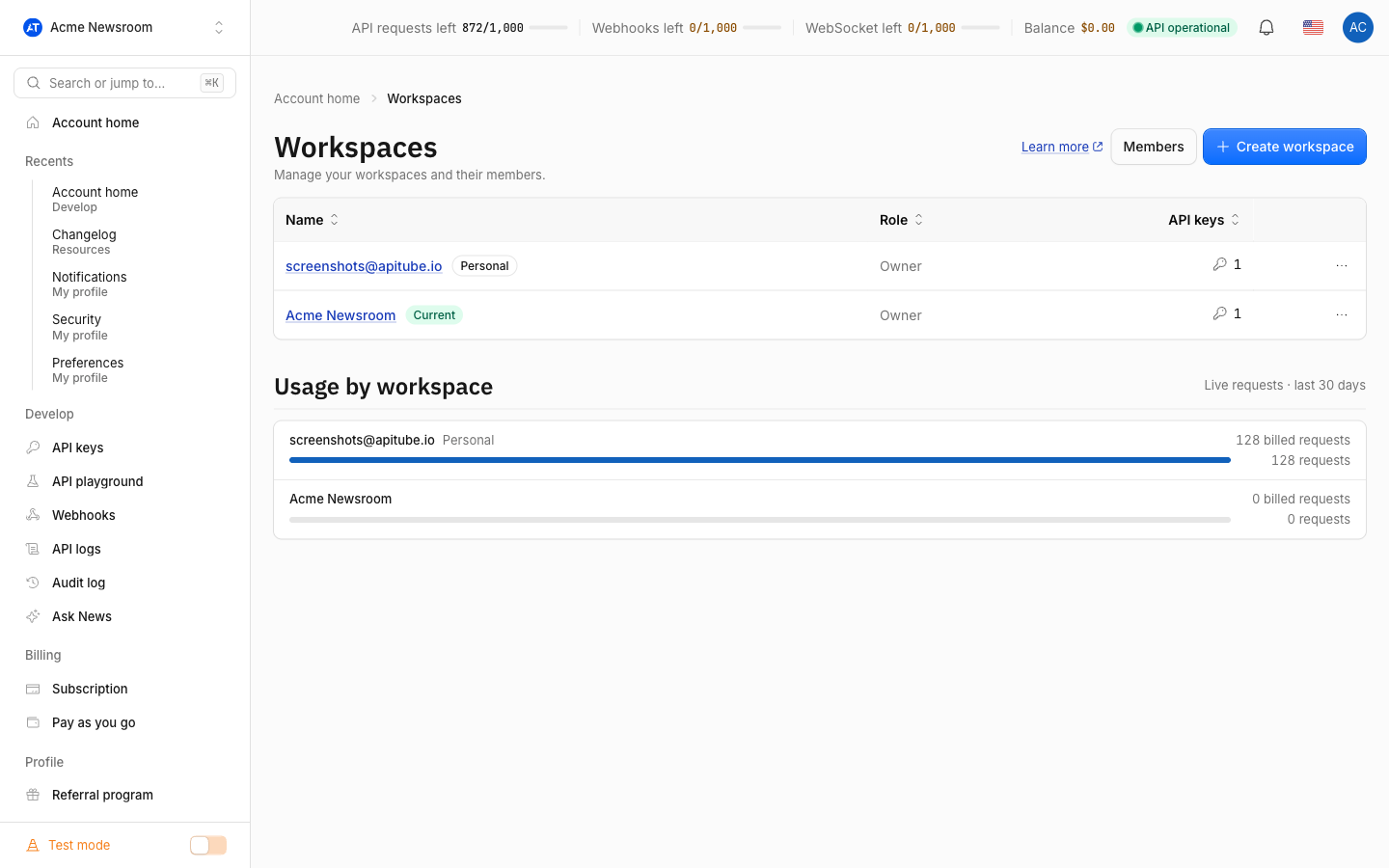
In an APITube workspace, the plan, quota and balance belong to the workspace owner, and every workspace that owner creates draws from the same shared pools. API keys are the only thing kept separate per workspace. So if the owner is on a plan with 150,000 requests, all of the owner’s workspaces and teammates share that one 150,000-request pool — usage anywhere counts against it. Only the owner can change the plan, top up, or see invoices.
This split lets a team spread work across several workspaces without paying several times: one subscription funds them all.
What is shared across the whole account?
These belong to the owner and are shared by every workspace the owner runs and every teammate in them:
- The subscription plan — Free, Starter, Basic, Professional or Corporate.
- The monthly request quota — the plan’s request allowance (its points): 100 per day on Free, 10,000 on Starter, 50,000 on Basic, 150,000 on Professional, 300,000 on Corporate.
- The SSE streaming quota — a separate streaming pool (1,000 Free / 3,000 Starter / 5,000 Basic / 15,000 Professional / 40,000 Corporate).
- The pay-as-you-go balance — the money that covers overflow at $0.01 per request once the plan pool is empty.
- The webhook limit — how many webhooks the account may run (1 Free / 5 Starter / 5 Basic / 20 Professional / 100 Corporate), counted across all of the owner’s workspaces.
Because these are account-level, a request sent with a key from any of the owner’s workspaces draws from the same quota. Splitting into more workspaces organises keys and people — it does not give you more quota.
What is kept separate per workspace?
API keys are scoped to a single workspace. Each workspace has its own set of keys, and a key you create in one workspace is not visible in another. This is how a team isolates a project or client: give each its own keys, revoke them independently, and read each workspace’s own request logs — while the spend still lands on the one shared quota.
Your personal dashboard settings — language, theme, avatar and date formatting — belong to you (the logged-in user), not to the workspace, so they follow you as you switch between workspaces.
Who can manage billing and see invoices?
Only the owner. Billing is the one area admins do not control. The four workspace roles line up like this:
- Owner — changes the plan, tops up the balance, cancels, and sees billing history.
- Admin — manages members, keys and webhooks, but cannot touch billing.
- Member — creates and uses keys, and sees usage; no billing, no member management.
- Viewer — read-only.
When a non-owner opens the Subscription page, they see the current plan but a note that it is managed by the owner — no upgrade, cancel or top-up buttons, and no billing history. Finances are never shown to teammates. For the full permission grid, see workspace roles: owner, admin, member, viewer.
Billing actions (change plan, manage, cancel, top up) open the APITube billing pages, which run on LemonSqueezy. They work off the owner's own login, which is exactly why only the owner sees them — a teammate clicking them would land on their own account, not the owner's.
How is usage counted and shown?
Every billed call spends one request from the shared pool, no matter which workspace or which key it came from. The dashboard overview shows the owner’s remaining request quota and SSE quota for the account as a whole, plus the plan and when the quota resets (Free resets daily; a paid plan resets on its renewal date).
Request logs, on the other hand, are shown per workspace: the overview and the Logs page filter the owner’s usage history down to the keys in the workspace you are currently viewing. That way each workspace sees its own traffic, even though the quota being consumed is the single shared account pool. To understand what one request costs and how the separate request, SSE and pay-as-you-go pools work, read how requests and credits work.
Common Questions
- Do more workspaces give me more quota?
- Can a teammate upgrade the plan or top up?
- Whose quota do my API keys spend?
- Can I see how much each workspace is spending?
Do more workspaces give me more quota?
No. Quota is tied to the owner’s plan, not to the number of workspaces. Creating a second or third workspace organises keys and teammates separately, but every one of them draws from the same request and streaming pools. To raise your limits you change the plan or add pay-as-you-go — not add workspaces.
Can a teammate upgrade the plan or top up?
No. Only the workspace owner can change the plan, top up the balance or cancel. Admins manage members and keys but have no billing access, and members and viewers have none either. A non-owner sees the current plan marked as managed by the owner with no billing controls. If you need to change the plan, ask the owner or become the owner of your own workspace.
Whose quota do my API keys spend?
The owner’s. A key lives in a specific workspace, but the request it sends is charged to the owner’s shared quota pool. This is true for every key in every workspace the owner runs, so a member using a key in a team workspace spends the same pool as the owner’s Personal workspace.
Can I see how much each workspace is spending?
Yes, per workspace. The Logs page shows the request history filtered to the current workspace’s keys, so you can compare traffic across the workspaces you belong to. The headline quota figure, though, is the shared account total — it does not split into a separate allowance per workspace, because there is only one pool.