
How to create an APITube account
Sign up with email and password — or Google or GitHub — and get a free plan and API key instantly

Written by Kent Hudson
July 2, 2026
Updated July 21, 2026
How to create an APITube account
To create an APITube account, open apitube.io, click Sign Up, and register with your email and a password — or with your Google or GitHub account. The moment you sign up you land on the free plan with a live API key already created, and you are signed straight into your dashboard. There is no email-verification step to wait through, so you can make your first request right away.
How to sign up with email and password
Clicking Sign Up on apitube.io opens the “Let’s create an account” dialog. To register with email:
- Type your email address.
- Type a password.
- Click Create account.
Your email has to be a valid address that is not already registered. If it is already in use, APITube shows the message “User with this email already exists” and you can switch to Sign In from the same dialog instead. A password is required — any value is accepted, but pick a strong one, because it is what guards access to your API keys and billing. Submitting the form signs you in immediately and takes you to your dashboard.
Can you sign up with Google or GitHub?
Yes. Above the email form, the same dialog has Create account with Google and Create account with GitHub buttons. Pick one, authorize APITube on the provider’s consent screen, and you return already signed in — there is no separate password to set. Use this route if you would rather not manage another password. Whichever method you choose, signing up means you agree to APITube’s terms of service, which are linked at the bottom of the dialog.
What do you get right after signing up?
Registration does more than create a login. As soon as your account exists, APITube sets you up so you can start calling the News API:
- The free plan. Your account starts on the free tier with a request allowance you can use straight away.
- A live API key, created for you. A key that starts with
api_live_is generated automatically and attached to your account — you do not have to create one by hand first. - You are signed in. You are redirected to your dashboard with an active session, ready to explore.
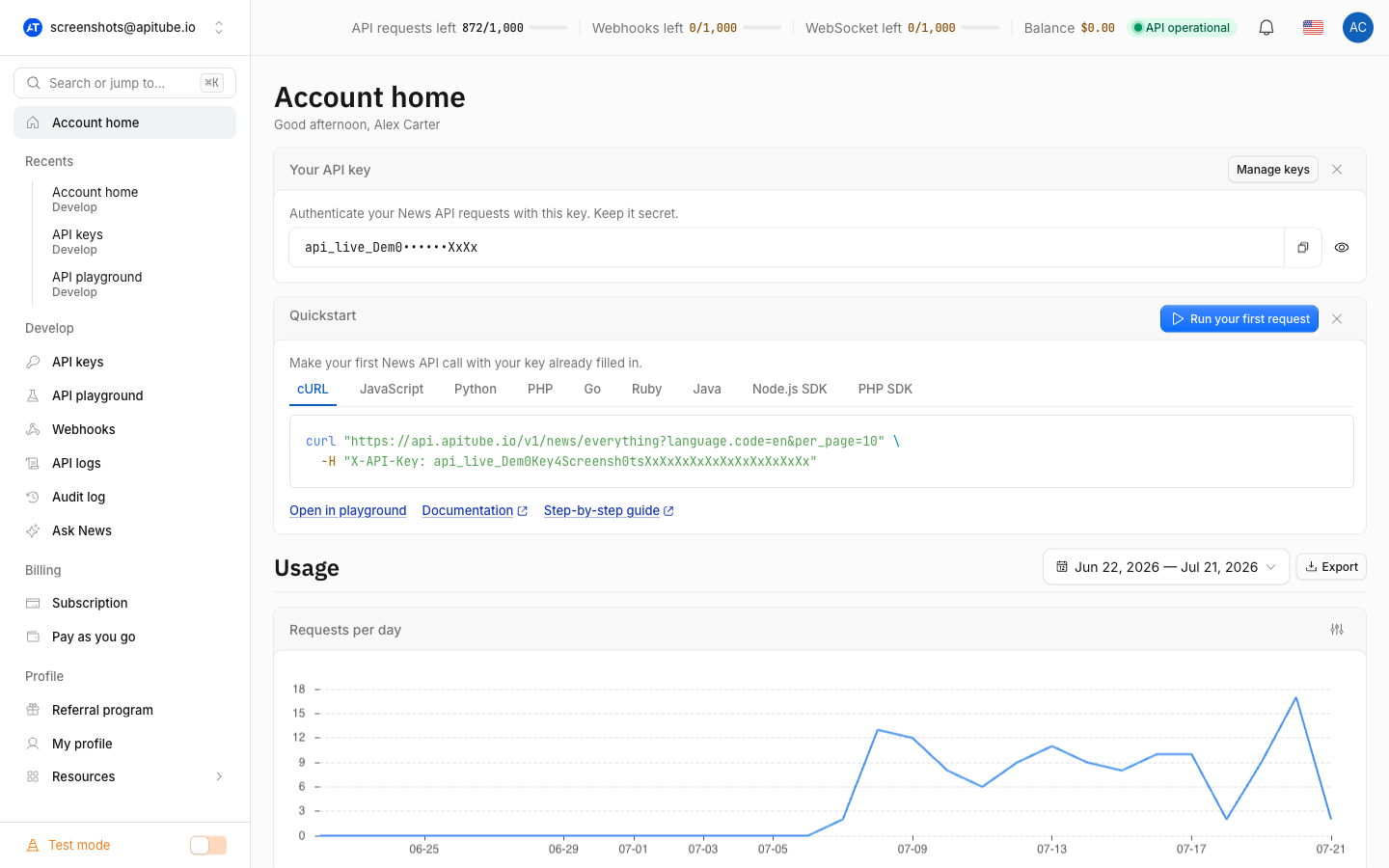
Once you copy that key from the API Keys page, a first call looks like this:
curl -H "X-API-Key: api_live_YOUR_KEY" \
  "https://api.apitube.io/v1/news/everything?per_page=5"
See where to find and create your API key to grab the value, then walk through how to run your first news search to confirm everything works.
Do you need a credit card or email verification to sign up?
No. Creating an APITube account asks only for an email and a password — or a Google or GitHub login — and nothing more. There is no credit-card field on the sign-up form, and there is no confirmation email you must click before you can use the account: registration signs you in on the spot. That means the fastest path from landing on apitube.io to your first API response is just three clicks: Sign Up, fill in your details, Create account. For the full credential reference once you are in, see the official authentication page on docs.apitube.io.
Common Questions
- What if my email is already registered?
- Do I need a credit card to create an account?
- Is there an email-verification step?
- Can I sign up with Google or GitHub instead?
What if my email is already registered?
APITube will not create a second account on the same address. If you try to register with an email that already exists, the dialog returns “User with this email already exists”. Switch to Sign In from the same dialog and log in with that email instead, or use the forgot-password link if you cannot remember the password.
Do I need a credit card to create an account?
No. The sign-up dialog only asks for an email and password (or a Google/GitHub login). Your new account starts on the free plan, so you can register and start making requests without entering any payment details.
Is there an email-verification step?
No. Registration signs you straight in and sends you to your dashboard — there is no confirmation email you have to click before the account works. APITube does send a welcome email after you sign up, but you do not need to act on it to use the API.
Can I sign up with Google or GitHub instead?
Yes. The “Let’s create an account” dialog offers Create account with Google and Create account with GitHub buttons alongside the email form. Authorize APITube on the provider’s screen and you are signed in without setting a password. You get the same free plan and automatically created API key either way.