
How to track your usage and quota
Read your remaining requests, SSE pool and reset date on the dashboard overview — plus quota alerts and the /v1/balance check

Written by Brian Hollis
August 11, 2026
Updated July 21, 2026
How to track your usage and quota
Open the dashboard overview (the home page) to track your usage and quota at a glance. A stat strip there shows your remaining API Usage requests, and your remaining SSE Usage pool, each with the date your quota resets. The big number under API Usage is what you have left, not what you have spent — the caption reads “requests remaining”. For a per-request log and charts, use the Logs page; for a programmatic check, call /v1/balance.
Your quota is the count of requests your plan grants for the period. Each billed call draws it down, the overview shows what is left, and the dashboard warns you before you run out — so you can top up or upgrade before requests start failing.
Where do you see your remaining quota?
The overview stat strip is the fastest read. It has these tiles:
- API Usage — your remaining standard requests, with a 7-day trend sparkline and a “Resets…” caption.
- SSE Usage — your remaining real-time streaming pool, tracked separately from standard requests.
Quota is shared at the account level, not per key — every API key in your workspace draws from the same pool. The strip appears in Live mode only: Test mode does not consume quota, so there is nothing to count there. If you are on a free plan the caption reads “Resets daily”; on a paid plan it reads “Resets {date}” — your monthly renewal date.
How big is my quota, and what resets it?
The size of your quota comes from your plan. The free plan includes 100 requests, Starter 10,000, Basic 50,000, Professional 150,000, and Corporate 300,000. The free plan’s quota resets every day; paid plans reset once per billing cycle, on the subscription renewal date shown in the caption.
Standard streaming over Server-Sent Events draws from a separate SSE pool, so heavy streaming will not eat into the standard request quota and vice versa — that is why the overview reports them as two distinct tiles.
What counts as one request against my quota?
Most calls cost one point. A standard search or retrieval call — /v1/news/everything, /v1/news/top-headlines, /v1/news/article, /v1/news/count, and similar endpoints — deducts a single point per request. Two endpoints cost more:
- Local news (
/v1/news/local) costs1plus one point for each insight you request, so a call asking for several insights costs more than one. - Fact-check (
/v1/fact-check) costs 5 points per call.
Failed and empty calls still count toward your per-key usage history (see how to view usage for each API key). When your standard quota hits zero, those endpoints return 402 with error code ER0176. If you are on a paid plan and you have a pay-as-you-go balance, eligible calls fall back to that balance instead of failing once your monthly requests are used up.
How do you get warned before running out?
The overview shows a quota insight banner automatically once you have used a large share of your monthly quota. At 75% used it appears as a warning; at 90% or more it turns critical. The banner reads “{percent}% of monthly quota used” and links straight to your subscription so you can upgrade. You do not have to enable anything — it is computed from your remaining points against your plan’s total.
How do you check usage over time and per key?
Two views go beyond the single “remaining” number:
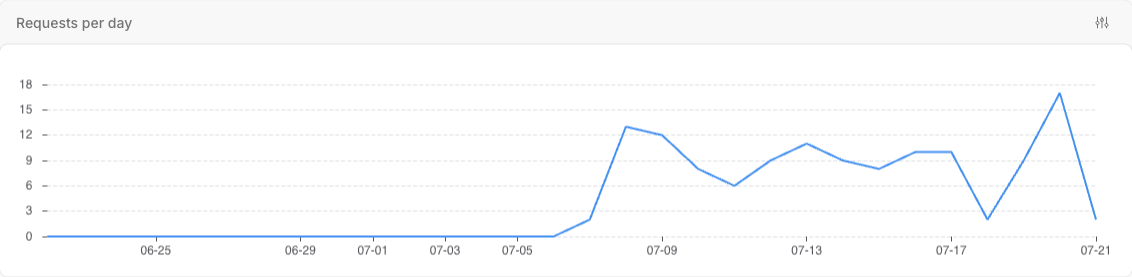
- The Logs page records every request — endpoint, status, latency, key and cost — and charts requests per day, cost per day, error rate and latency percentiles above the table. See how to view and search your request logs.
- Per-key usage attributes spend to each key with a lifetime usage points total and a date-range breakdown of requests, cost and top endpoints.
To read your remaining quota from code instead of the dashboard, call the /v1/balance endpoint, which returns your remaining points and never spends any itself — see how to check your API balance and remaining quota.
Common Questions
- Is quota counted per API key or per account?
- Why does the overview hide the quota strip in Test mode?
- Does SSE streaming use my standard request quota?
- What happens when I run out of requests?
Is quota counted per API key or per account?
Per account. Every key in your workspace draws from one shared pool, so the overview’s “API Usage” number is the same no matter which key spends it. Per-key numbers exist only for attribution — to see which key drives your traffic — not as separate limits.
Why does the overview hide the quota strip in Test mode?
Because Test-key requests do not consume quota. The plan, API Usage and SSE Usage tiles only appear in Live mode, where requests are billed against your pool. Switch to Live mode to see your remaining quota and reset date.
Does SSE streaming use my standard request quota?
No. Streaming over Server-Sent Events draws from a separate SSE pool, shown as its own “SSE Usage” tile on the overview. Standard search and retrieval requests draw from the API Usage pool. Exhausting one does not exhaust the other.
What happens when I run out of requests?
Standard endpoints return 402 (ER0176) once your points reach zero. On a paid plan with a pay-as-you-go balance, eligible calls are charged to that balance instead. Free plans reset daily and paid plans reset on the renewal date shown in the overview, so quota also returns automatically when the period rolls over.