
How to view usage for each API key
See a key's lifetime usage points, last-used time and per-period requests

Written by Erick Horn
June 28, 2026
Updated July 21, 2026
How to view usage for each API key
You view usage per API key in the dashboard, where every key carries its own usage stats. The API Keys list shows a Usage points and Last used column for each key at a glance, and opening a key reveals its detail page with a lifetime total plus a date-range breakdown of Requests, Cost and Top endpoints. Usage is tracked separately for every key, so you can see exactly which key drives your traffic.
Per-key usage tells you which key powers which workload, which keys sit idle (good candidates to revoke), and where your spend goes by endpoint. It is attribution, not a limit — your quota and credits are pooled at the account level, not per key.
Where to find per-key usage in the dashboard
There are two views, from summary to detail:
- The API Keys list. Every row shows the key’s Name, Key, Usage points, Last used, Created date and Status. This is the quick overview across all your keys.
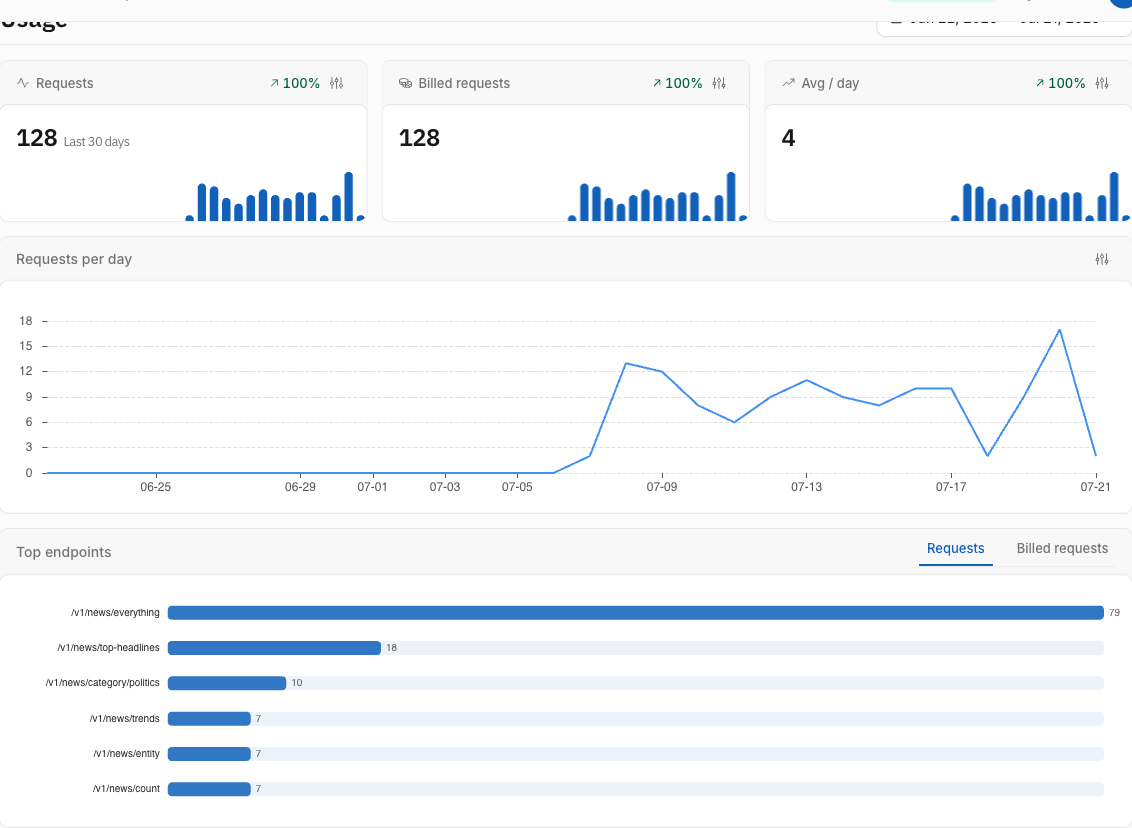
- A single key’s detail page. Click a key to open it. The top stat strip shows Usage points (total), Last used, Created, Expires and Status. Below it, a usage section charts activity over a date range, and a Request logs section lists the individual requests made with that key.
To create or revoke the keys you are inspecting, see how to create, rename and revoke API keys.
What does the “Usage points” total mean?
Usage points is the running, lifetime total of credits charged to that one key since it was created. On every billed request, the News API adds that request’s cost to the key’s usage_points counter and stamps its Last used time. Most requests cost one point, so for typical traffic the number is close to the count of requests the key has ever made.
This total only ever goes up — it is a cumulative odometer for the key, not a remaining balance. Because it is stored on the key itself, it is always complete, even for activity older than your request-log history.
How to see a key’s requests over a date range
The usage section on the key’s detail page reads your request logs, filtered to that key, and aggregates them over a date range you choose:
- Requests — how many calls the key made in the range.
- Cost — the credits those calls consumed.
- Avg / day — average requests per day across the range.
- Top endpoints — which endpoints the key called most, so you can see whether it leans on
/v1/news/everything,/v1/news/top-headlines, or something else.
Each metric also shows a change versus the previous period of equal length, and a per-day chart. Switching between Test and Live mode re-scopes the view to keys of that mode. For request-by-request detail — status code, latency, endpoint and calling IP — use the Request logs section right below it.
Common Questions
Is there a separate quota or limit per key?
No. Usage is tracked per key for visibility, but your quota, credits and balance live at the account level and are shared across all of your keys. Spending through one key draws down the same pool as any other. To check your remaining account balance programmatically, see how to check your balance via the API. If you want to cap what one key can do, restrict it by endpoint scopes rather than a usage limit.
Why is the lifetime total higher than the date-range numbers?
The two are measured differently. Usage points (total) counts every credit the key has spent since it was created. The usage section only counts requests inside the date range you picked and that appear in your request logs. Narrow the range and the Requests and Cost figures naturally fall below the lifetime total; widen it to bring them closer.
What counts toward a key’s usage?
Every billed request you make with the key. Each request adds its credit cost to the key’s total, updates its Last used time, and writes a log line recording the endpoint, status, latency and calling IP. Failed and empty requests are logged too, so the count reflects all traffic, not just successful searches.
Can I tell which endpoints a key uses most?
Yes — the Top endpoints breakdown in the usage section ranks a key’s calls by endpoint over the selected range. It is the fastest way to confirm a key is only hitting the endpoints you expect, which pairs naturally with locking the key down using endpoint scopes.