
How to Close Your APITube Account
Revoke every API key, change your sign-in email and sign out from Account → Security

Written by Brian Hollis
July 3, 2026
Updated July 21, 2026
How to close your APITube account
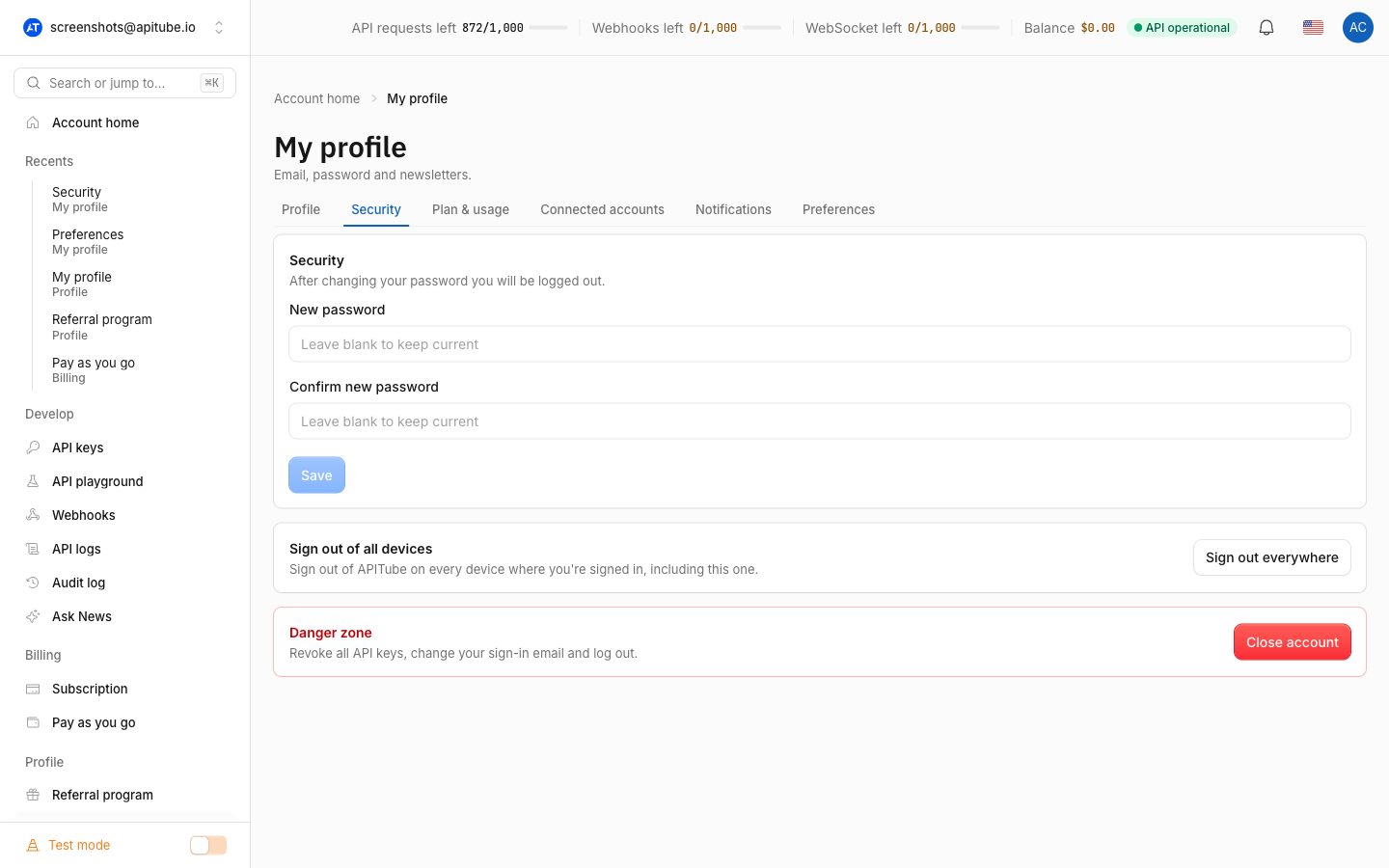
To close your APITube account, open the dashboard, go to Account → Security, and click Close account in the Danger zone card. A dialog asks you to type your own email to confirm; once you do, closing revokes all your API keys, changes your sign-in email, and signs you out. It cannot be undone from the dashboard, so treat it as final.
Closing your account is different from signing out. Signing out everywhere ends your login but keeps your API keys working; closing your account revokes every key at once, so any app that still sends one will start failing.
What happens when you close your account?
Closing your account does three things in one step: it revokes every active API key on the account, changes your sign-in email, and rotates your login so you are signed out immediately. After it runs you see a short “Account closed — signing you out” message and the dashboard sends you to the sign-out page.
Because the sign-in email is changed, you can no longer log in with your old email and password — that pair no longer matches an account you can reach. And because the keys are revoked, any integration that authenticates with one of those keys stops working right away. This is why it is a Danger zone action rather than a normal setting.
Where is the close account button?
The button lives on the Security tab of your Account page, in a red-outlined Danger zone card. The card is labelled “Revoke all API keys, change your sign-in email and log out.” so it states exactly what the action does before you start.
Click Close account to open the confirmation dialog titled “Close your account?”. The dialog repeats the warning — “This revokes all your API keys, changes your sign-in email and logs you out. It cannot be undone from the dashboard.” — so there is a deliberate second step before anything happens.
How do I confirm closing my account?
APITube uses a type-to-confirm step so you cannot close the account with a single stray click. The dialog shows “Type <your email> to confirm” and the Close account button stays disabled until the text you enter exactly matches the email on your account.
This is checked twice: the dashboard disables the button until the email matches, and the server verifies the same email again when the request arrives. If the confirmation email does not match — for example an empty or mistyped value — the request is rejected and nothing is closed, so a partial or accidental close is not possible.
Does closing my account cancel my subscription?
Closing your account does not automatically cancel a paid subscription. The close action only revokes keys, changes your sign-in email and signs you out — it does not touch billing. If you are on a paid plan, cancel the subscription from your billing settings before you close the account, otherwise the subscription can keep renewing even though you can no longer sign in to manage it.
The same applies to any Pay As You Go balance: closing the account does not refund or move a balance, so spend down or stop using it first if that matters to you.
Close account vs. sign out everywhere: which do I need?
Pick based on what you are trying to stop:
- Sign out everywhere — ends your dashboard login sessions on every device but leaves your API keys active. Use it after signing in on a shared computer or if you think someone reached your dashboard. See how to sign out of all devices.
- Revoke one key — cuts off a single leaked or unused key while the rest keep working. See how to create, rename and revoke API keys.
- Close account — the most drastic option: revokes every key, changes your sign-in email and signs you out for good.
If your real goal is just to rotate a compromised key or a leaked login, use one of the first two — closing the account is only for leaving the service entirely.
Common Questions
- Can I undo closing my account?
- Will my API keys still work after closing?
- Does closing my account erase all my data?
- Can I close only part of my account, like one workspace?
Can I undo closing my account?
Not from the dashboard — the confirmation dialog states plainly that the action “cannot be undone from the dashboard.” Closing changes your sign-in email and rotates your login, so you cannot simply log back in with your old credentials and reverse it yourself. If you closed the account by mistake and need help, contact [email protected] rather than trying to sign in again.
Will my API keys still work after closing?
No. Closing your account revokes all of its API keys at the same time, so every request that sends one of those keys will start failing. This is the key difference from signing out of all devices, which leaves your keys running. Before you close, make sure no live application depends on those keys, or move that traffic to a different account first.
Does closing my account erase all my data?
Closing your account stops your access — it revokes your keys, changes your sign-in email and signs you out — but it is designed as a “close,” not a self-service data wipe, which is why it cannot be reversed from the dashboard. If you specifically need your personal data removed rather than just your access closed, contact [email protected] with that request.
Can I close only part of my account, like one workspace?
No. Close account applies to your whole account, not a single workspace or a single key. To scope things down instead, revoke an individual key from your API keys page, or manage members and workspaces from your team settings. Reserve Close account for when you want to leave APITube completely.