
How to Ask Questions with Ask News
Type a plain-language question in your dashboard and get a sourced answer built from live News API articles

Written by Jacob Partington
July 4, 2026
Updated July 21, 2026
How to ask questions with Ask News
To ask a question with Ask News, open Ask News from your APITube dashboard sidebar, type a plain-language question about current events into the box at the bottom, and press Enter. Ask News searches the News API for matching articles and writes a short answer with numbered source links you can click straight through to the publisher. There is no query syntax to learn — you write the way you would ask a person.
When you open a fresh chat, the screen shows “Ask anything about the news” and three ready-made example questions — Latest news about Tesla, What’s happening with AI regulation?, and Summarize today’s top business headlines. Click any one to send it instantly, or ignore them and type your own.
How do you send a question?
The message box sits at the bottom of the chat, with the placeholder “Ask about the news…”. Type your question and send it in one of two ways:
- Press Enter to send.
- Press Shift + Enter to add a line break without sending, for a longer, multi-line question.
While Ask News is working, the send arrow turns into a Stop button — click it to cut a long answer short. Clear, event- or topic-focused questions work best, because each one maps onto a news search: “What’s the latest on SpaceX?” or “Recent news about AI regulation in Europe” both work well.
How do you read the answer and its sources?
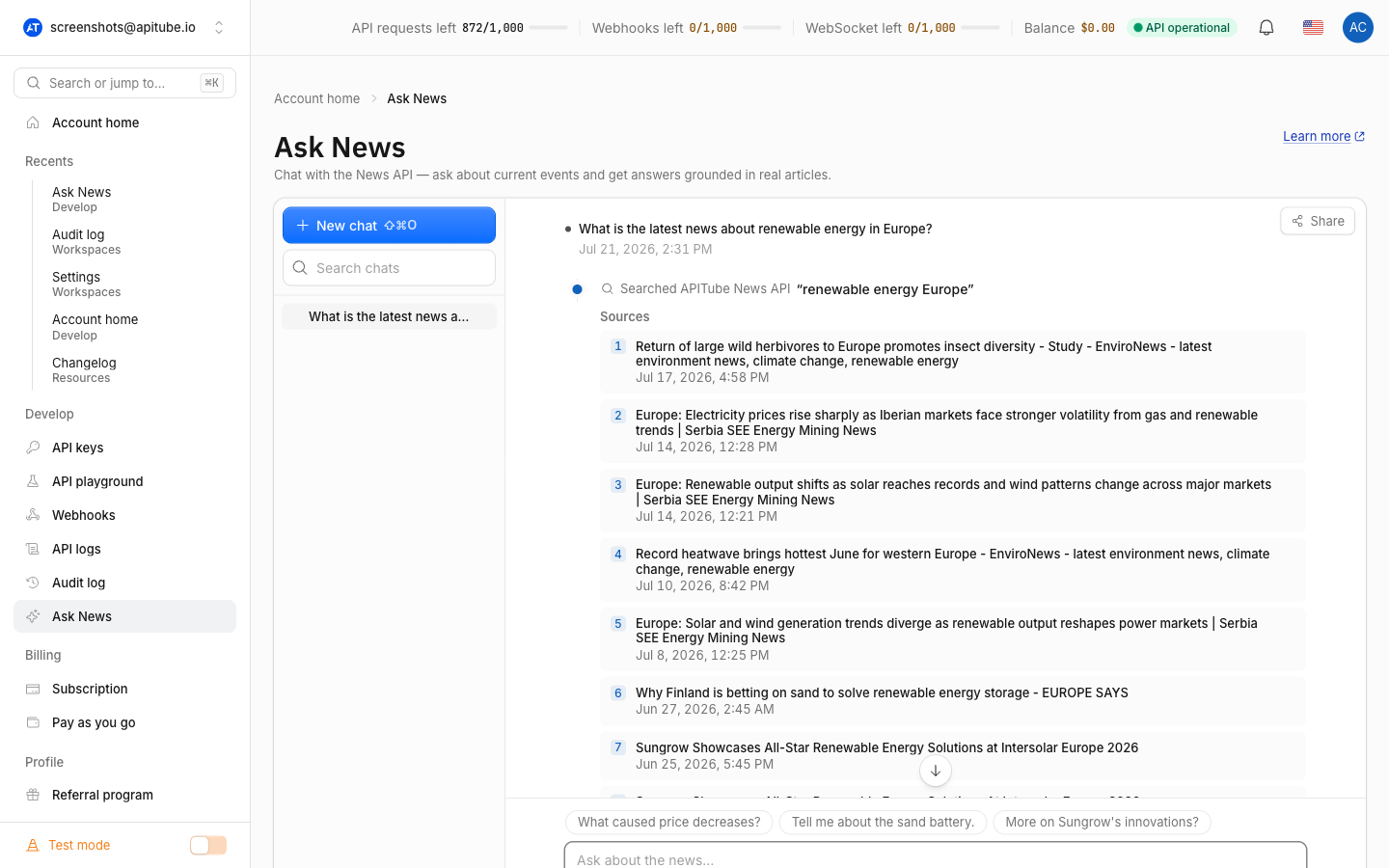
Ask News answers in a step-by-step timeline so you can see what it did. First it may show “Looking up references…” while it resolves a name (like a company or person) to an ID, then “Searching APITube News API…” with your search terms in quotes, followed by “Searched APITube News API” once results come back. If a search finds nothing, it shows “No results” instead of guessing.
Below the steps comes a Sources block: numbered cards, each with the article’s headline, its publisher domain, the publish date, and a thumbnail. Every card links to the original article and opens it in a new tab. The written answer follows, and any claim it makes links back to a source as a small superscript footnote like [1] — click the number to jump to that exact article. Sources are de-duplicated and the block lists up to 12 articles per answer. Because every statement is grounded in a real article, the fastest way to verify something is to follow its footnote.
What can you do with an answer?
Under each answer is a small row of actions:
- Copy — copies the answer text plus a plain-text list of its sources to your clipboard, so you can paste both into a doc or message. The button briefly reads Copied to confirm.
- Open in Playground — appears when the assistant ran a news search. It opens the dashboard Playground pre-filled with that search’s parameters, so you can run and tweak the real API request yourself.
- Create webhook — also appears after a search, to turn an exploratory question into an ongoing feed for the same query.
A timestamp sits at the end of the row. Under the message box you will always see the reminder: “Answers are AI-generated from APITube News API results and may be inaccurate.” — so treat answers as a starting point and follow the cited links for anything important.
How do you keep a conversation going?
After each answer, Ask News offers a few suggested follow-up questions as chips just above the message box — click one to ask it, or keep typing your own. Follow-ups let you drill in (“Who are the key people involved?”, “What happened last week?”) without re-explaining the topic.
To start over on a new subject, click New chat at the top of the history rail (or press ⇧⌘O). Each conversation is saved to your account and titled automatically from your first question, so you can leave and come back to it later. If an answer fails, an error box appears with a Retry button to run it again.
How do you find and manage past chats?
Your saved conversations live in the history rail on the left (on mobile, tap History to open it). At the top is a Search chats box that filters your history by chat title and by the text inside the messages, so you can find a discussion by what was said in it. In the list you can:
- Click the star on a chat to favorite it — favorites are pinned to the top of the list.
- Click a chat’s title to reopen it.
- Open the ⋯ menu on a chat to Rename, Delete, or share it.
Sharing turns a chat into a public read-only link — see how to share an Ask News conversation for the full walkthrough. For a broader picture of what Ask News is and how it grounds answers, see what is Ask News.
Common Questions
Do I need to know API parameters to use Ask News?
No. Ask News takes plain-language questions and builds the news search for you — you never write title, sort.by, or any other parameter. If you later want the raw request behind an answer, use Open in Playground on that answer to see and edit the actual API call.
How do I send a multi-line question?
Press Shift + Enter inside the message box to add a line break without sending. A plain Enter always sends the message, so use Shift + Enter whenever you need more than one line before submitting.
Can I stop an answer while it is being written?
Yes. While Ask News is generating, the send button becomes a Stop button. Click it to end the response early — useful if you already have what you need or want to rephrase.
Where do the follow-up suggestions come from?
They are generated from your last question and its answer, and appear as chips above the message box once a response finishes. They are optional shortcuts: click one to ask it, or ignore them and type your own next question.