
How to share an Ask News conversation
Turn any saved Ask News chat into a public, read-only link — and disable it whenever you want

Written by Jacob Partington
July 4, 2026
Updated July 21, 2026
How to share an Ask News conversation
To share an Ask News conversation, open the saved chat in your APITube dashboard and click Share — the link is copied to your clipboard automatically, and anyone you send it to can open a public, read-only copy of the conversation without signing in. You can turn the link off again at any time with Disable link, which revokes access immediately.
Sharing works on a chat you have already used: Ask News saves each conversation to your account and gives it an automatic title from your first question, and only a saved conversation can be shared. Ask a question first, then the Share option is available.
How do you create a share link for a conversation?
Open Ask News from the dashboard sidebar, then create or open the chat you want to share. There are two places to start sharing:
- In the chat itself, click Share in the top-right corner of the conversation.
- Or, in the history list on the left, open the ⋯ menu next to a conversation and choose Share.
A confirmation dialog titled “Share this conversation?” spells out what happens — anyone with the link will be able to read the conversation, and you can disable the link at any time:
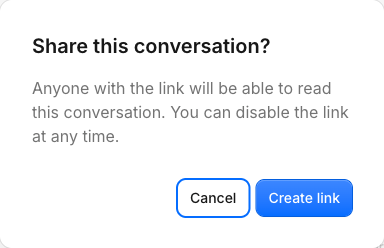
Click Create link, and APITube creates the public link and copies it to your clipboard right away — you will see a “Share link copied” confirmation. The link points at a page under your dashboard’s /shared/ path with a long random token, for example:
https://dashboard.apitube.io/shared/3f9a1c7e0b2d4f68a1c3e5079b2d4f61Paste that link into an email, a message, or a document to share the conversation. Nothing about the chat is public until you create this link.
What can people who open the link see?
The link opens a read-only page showing the conversation’s title and the full message thread — your questions and the AI’s answers, including the source links Ask News cited. The page header carries the APITube logo and a “Shared chat · read-only” label, and the footer links back to the APITube News API site. Visitors do not need an APITube account or a login to read it — the link alone is enough.
Because the page is read-only, there is no message box on it: people with the link cannot continue the chat, reply, or edit anything. They see the conversation exactly as it was when you shared it. The shared page is also marked so search engines will not index it, so it will not appear in Google — it is reachable only by the exact link you send.
How do you copy the link again or stop sharing?
Once a conversation is shared, the button changes from Share to Copy share link. Clicking it copies the same link again — sharing is idempotent, so a conversation keeps one stable link for as long as it stays shared. You can hand the same link to more people without generating a new one.
To stop sharing, open the ⋯ menu on the conversation and choose Disable link. Access is removed immediately: the token stops resolving, so anyone who opens the old link now gets a “not found” page, and you will see a “Sharing disabled” confirmation. If you share the same conversation again later, APITube mints a brand-new link — the disabled one stays dead and cannot be reused.
Who can share a conversation, and what stays private?
Conversations in Ask News are personal to your account, so only you can create or disable a share link for your own chats — sharing is tied to the account that owns the conversation. By default every conversation is private; nothing leaves your account until you deliberately create a link.
The share link is a long random token, so it cannot be guessed — only the people you send it to can open the page. Treat the link like a password: anyone who has it can read that one conversation until you disable it. Disabling the link is the way to revoke access when a chat should no longer be public.
Common Questions
Can people reply to or edit a shared conversation?
No. A shared conversation is strictly read-only. The public page has no input box, so visitors can only read your questions and the AI’s answers — they cannot continue the chat, add messages, or change anything. To keep the conversation going, use it yourself in the dashboard; the shared copy just reflects what was there when you shared.
Will a shared conversation show up in Google?
No. The shared page is set to no-index and no-follow, so search engines will not list it. It is reachable only through the exact link you send. That said, the page itself is public to anyone who has the link, so share it only with people you want to see the conversation.
Does re-sharing create a new link each time?
Not while the chat is already shared. Clicking Share (or Copy share link) on a conversation that is currently shared copies the same, stable link. A new link is created only if you first Disable link and then share again — at which point the previous link stays permanently disabled.
Can I share a chat before I’ve asked anything?
No. Only a saved conversation can be shared, and a conversation is saved once you have asked at least one question — Ask News stores it automatically and titles it from your first message. Start the chat, send a question, and the Share option becomes available.