
Where to Find APITube Product Updates and Changelog
Find the public changelog and the in-dashboard release notes, and read how each versioned, dated entry is organized

Written by Erick Horn
July 4, 2026
Updated July 21, 2026
Where to find APITube product updates and changelog
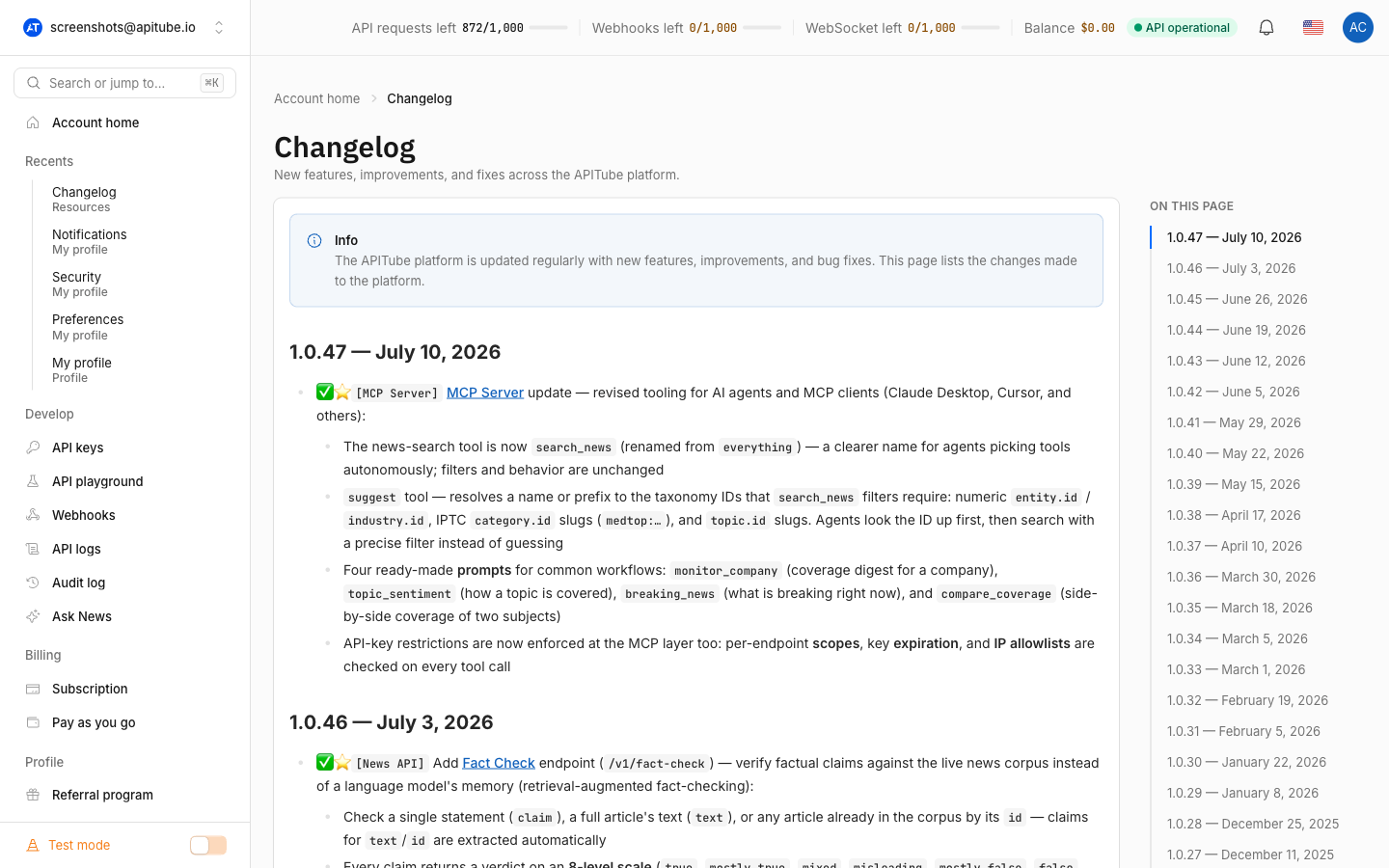
APITube publishes every platform change in one public changelog at docs.apitube.io/platform/changelog, and the exact same log is built into your dashboard under Changelog. Each release is versioned and dated with the newest entry at the top, so you can see precisely what shipped, when it shipped, and which part of the platform it touched.
There are two places to read it, and they never disagree because the in-dashboard page renders the same underlying file as the public docs page. Use the public page when you have no login open; use the dashboard page when you are already signed in and want updates next to your keys and usage.
Where is the APITube changelog?
There are two official surfaces for product updates:
- Public docs: docs.apitube.io/platform/changelog — open to everyone, no login required. It is linked from the main site’s top navigation (under the “Changelog” item) and again in the site footer, so you can always reach it.
- In your dashboard: open Changelog from the sidebar at
dashboard.apitube.io/changelog. This page reads the same source as the public docs changelog, so the release notes you see there are identical to the public ones — just placed inside your account.
Because both surfaces come from a single source, you never have to reconcile two versions of “what changed.” Pick whichever is closer to hand.
What does the APITube changelog include?
The changelog lists new features, improvements, and bug fixes made to the platform — that is its whole job, as the note at the top of the page states. Each entry is tagged to show the area it affects (for example [News API]), and when an entry introduces a feature, it links straight to that feature’s documentation page.
Recent additions read as a timeline of what the News API has gained. For instance, the log records the Fact Check endpoint, entity-level sentiment filters, Webhooks push delivery, the Local News endpoint, and the People / Companies / Journalists reference endpoints — each with the version and date it landed. So the changelog doubles as a quick map of newer capabilities: if you are unsure whether a feature exists yet, its presence (and date) in the log is the answer. To go deeper on any of these, follow the in-entry link — for example the webhooks overview.
How is the APITube changelog organized?
Every release is a heading in the form version — date, newest first. A real header looks like:
## 1.0.46 — July 3, 2026Under each version header is a bullet list of the changes in that release. The history runs all the way back to version 1.0.1 (December 12, 2024), so the changelog is a complete record of the platform’s releases, not just the latest few. Reading top-to-bottom gives you the most recent work; scrolling down walks backward through every prior version.
How do I find when a feature was added?
Open the changelog and search the page with your browser’s find (Ctrl+F / Cmd+F) for the feature’s name — a parameter, an endpoint, an error code. The nearest version — date header above the match tells you the release it shipped in and the date it went live. Because entries also carry documentation links, you can jump from the changelog straight to the full reference for that feature.
The changelog and the status page answer different questions. The changelog is the historical record of what changed in the platform (features, fixes, new endpoints). The status page at status.apitube.io is about live health — whether the API is up right now and its incident history. If an integration suddenly breaks, check the status page; if you want to know what a new field or endpoint is, check the changelog.
Common Questions
- Is the dashboard changelog different from the public one?
- How far back does the changelog go?
- Where do I report a bug or request a feature?
- Do the changelog entries link anywhere?
Is the dashboard changelog different from the public one?
No. The Changelog page in your dashboard renders the same source file as the public docs.apitube.io/platform/changelog page, so the two show identical release notes. The only difference is context: the public page needs no login, while the dashboard page sits inside your account next to keys, usage, and billing.
How far back does the changelog go?
All the way back to the first release. The oldest entry in the log is version 1.0.1, dated December 12, 2024, and every release since then is listed above it in order. That makes the changelog a full history of the platform rather than a rolling “recent changes” snippet.
Where do I report a bug or request a feature?
The changelog is read-only — it records what has already shipped, not requests. To flag a problem or suggest something new, follow how to report a bug or request a feature. New work, once released, then shows up in the changelog with its version and date.
Do the changelog entries link anywhere?
Yes. When a changelog entry introduces a feature, it links to that feature’s documentation page (for example a new endpoint links to its reference). Following the link takes you from the one-line summary in the changelog to the full parameters and examples in the docs, so you can go from “this exists now” to “here is how to call it” in one click.